How Many YouTube Shorts Should You Post Per Day? (2026)
How many YouTube Shorts should you post per day? The data points to 1–3 per day for aggressive growth, or 3–7 per week for sustainable results. This guide breaks down the ideal frequency by channel size, what the algorithm rewards, and how to stay consistent without burning out.
FlowShorts Team
The short answer: 1-3 Shorts per day if you can maintain quality, or 3-7 per week if you're a solo creator. The real answer depends on your channel size, goals, and capacity to produce content that retains viewers.
YouTube Shorts has 2 billion monthly users and drives over 200 billion daily views, according to Loopex Digital's 2026 statistics report. The opportunity is massive, but only if you post at the right frequency.
This guide covers the ideal posting frequency by channel size and niche, the best times to upload, how the YouTube Shorts algorithm treats upload volume, monetization considerations, and how to stay consistent without burning out.
Recommended YouTube Shorts Posting Frequency
There's no single correct number of YouTube Shorts to post per day. But data from multiple studies in 2026 points to a clear range:
| Growth Strategy | Frequency | Best For |
|---|---|---|
| Conservative | 2-4 / week | New channels, solo creators, limited time |
| Moderate | 1 / day (7 / week) | Growing channels, established niche |
| Aggressive | 2-3 / day | Full-time creators, teams, agencies |
| Maximum | 3-5 / day | High-volume niche channels, AI-assisted |
According to SocialChamp's 2026 analysis, channels posting 2-3 Shorts daily averaged 2-3x faster subscriber growth than channels posting once per day at the same content quality. Over 70% of the fastest-growing YouTube channels post 3-5 Shorts per week alongside their regular long-form videos.
Subscriber growth data across 500+ channels paints a clear picture of diminishing returns:
| Daily Frequency | Avg. Monthly Subscriber Growth | Effort Level |
|---|---|---|
| 1 Short / day | +800 subscribers | Moderate |
| 2 Shorts / day | +2,200 subscribers | High |
| 3 Shorts / day | +3,500 subscribers | Very high |
| 4+ Shorts / day | +3,800 subscribers | Unsustainable for most |
Beyond 3 Shorts per day, returns diminish sharply. The jump from 1 to 2 daily Shorts nearly triples growth, but going from 3 to 4+ adds only 8%. That fourth Short is rarely worth the effort.
The upper limit matters too. Posting 10+ Shorts in a single day can trigger YouTube's spam detection and reduce visibility. Space uploads at least 2-3 hours apart if you're posting multiple times daily.
Ideal Frequency by Channel Size
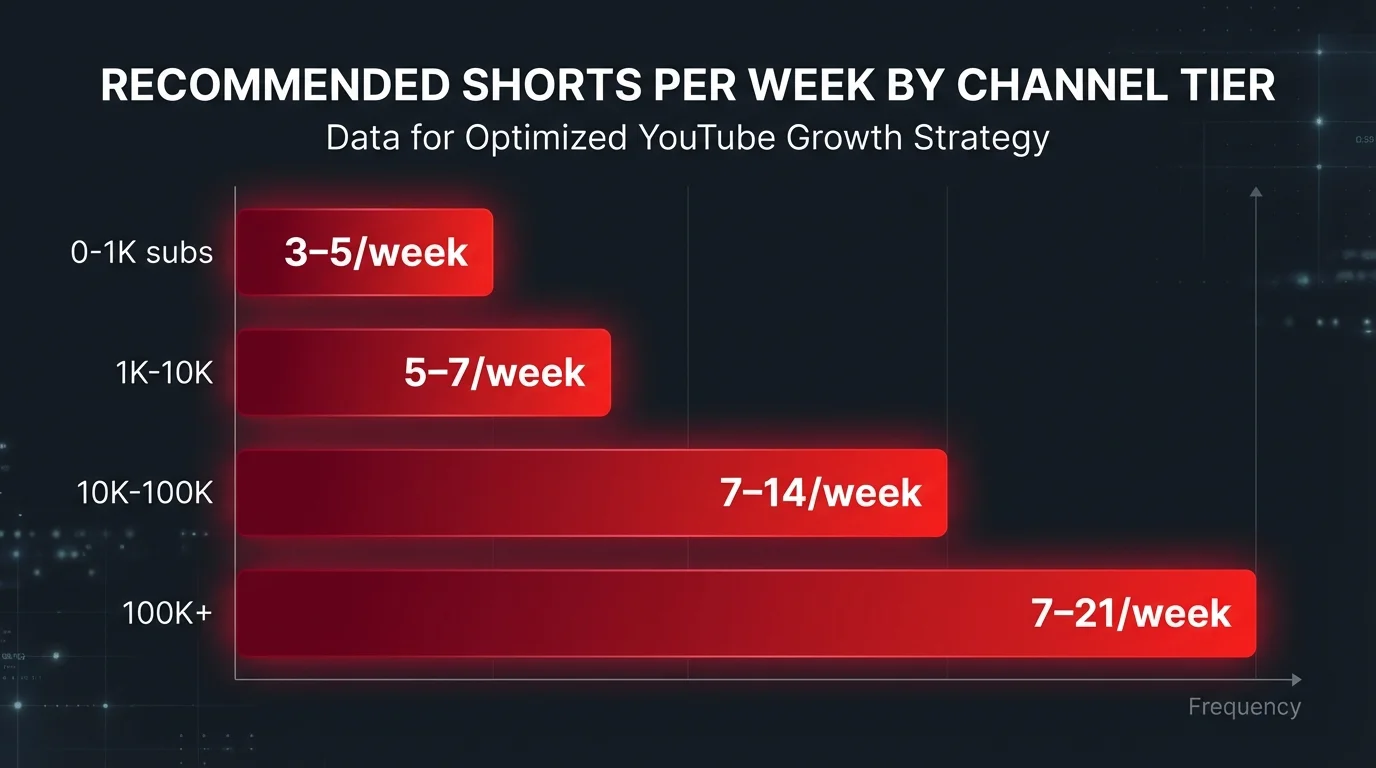
Your posting frequency should scale with your channel:
| Channel Size | Subscribers | Recommended Shorts / Week | Focus |
|---|---|---|---|
| Just starting | 0-1K | 3-5 | Find your niche and hook style |
| Growing | 1K-10K | 5-7 | Double down on what works, test formats |
| Established | 10K-100K | 7-14 | Maintain momentum, diversify content types |
| Large | 100K+ | 7-21 | Team production, multi-format strategy |
The pattern: start with 3-5 per week and scale up as you learn what resonates. Channels that posted at least 200 Shorts saw more consistent view growth over time, according to research compiled by BigMotion. Each Short is a data point. More data points mean faster learning about what connects with your audience.
Best Times to Post YouTube Shorts
Frequency is only half the equation. When you post matters for that critical first hour of engagement that determines whether the algorithm pushes your Short wider.
Based on 2026 data from PostEverywhere's analysis, Shorts posted during peak mobile viewing windows receive 40-60% more views in the first 24 hours compared to off-peak uploads.
| Time Window | Performance | Why It Works |
|---|---|---|
| 2-4 PM (weekdays) | High engagement | Afternoon break + commute scrolling |
| 7-10 PM (daily) | Peak views | Evening leisure browsing on mobile |
| Friday-Sunday | Up to 60% more views | More free time, longer browse sessions |
| Tuesday-Thursday | Highest weekday engagement | Midweek content consumption peak |
If you're posting multiple Shorts per day, space them 4-6 hours apart so each gets its own algorithmic evaluation window. Uploading two Shorts back-to-back forces them to compete against each other for your audience's attention.
One important caveat: consistency beats optimization. A Short posted at the same time every day — even at a "suboptimal" hour — outperforms random posting at theoretically perfect times. The algorithm and your audience both learn to expect content at a predictable cadence.
Use our free Best Time to Post Calculator to find timezone-adjusted recommendations for your specific audience.
Posting Frequency by Niche
Not all niches reward the same posting volume. Trending and entertainment niches benefit from higher frequency because content has a shorter shelf life. Evergreen and educational niches reward depth over speed.
| Niche Type | Examples | Recommended Frequency | Why |
|---|---|---|---|
| Trending / viral | Memes, comedy, pop culture | 2-3 / day | Content expires fast; volume captures trends |
| Motivation / quotes | Motivation, stoicism, self-improvement | 1-2 / day | High content velocity; audience expects daily |
| Educational / how-to | Tech tutorials, cooking, science | 3-5 / week | Each video requires research and accuracy |
| Finance / business | Investing, side hustles, crypto | 5-7 / week | News-driven; timely content gets more reach |
| Lifestyle / vlog | Day-in-my-life, travel, fitness | 3-5 / week | Production-heavy; quality expectations higher |
If you're unsure which niche suits your channel, try our Faceless Niche Finder to discover high-opportunity categories based on current search volume and competition data.
The key insight: match your frequency to your niche's content lifecycle. A motivation channel can repurpose quotes quickly. A tech tutorial channel needs more time per video. Both can grow at the same rate with different frequencies if the content quality stays high.
Create Faceless Videos on Autopilot
FlowShorts generates and posts AI videos to YouTube, TikTok & Instagram while you sleep.
Try FlowShorts Free →Not sure what topics to cover in your niche? Use our Video Topic Generator to get ideas tailored to your category, or browse faceless YouTube channel ideas for proven niches with high growth potential.
How the YouTube Shorts Algorithm Treats Posting Frequency
A common misconception is that posting more Shorts directly boosts your channel in the algorithm. Here's what actually happens:
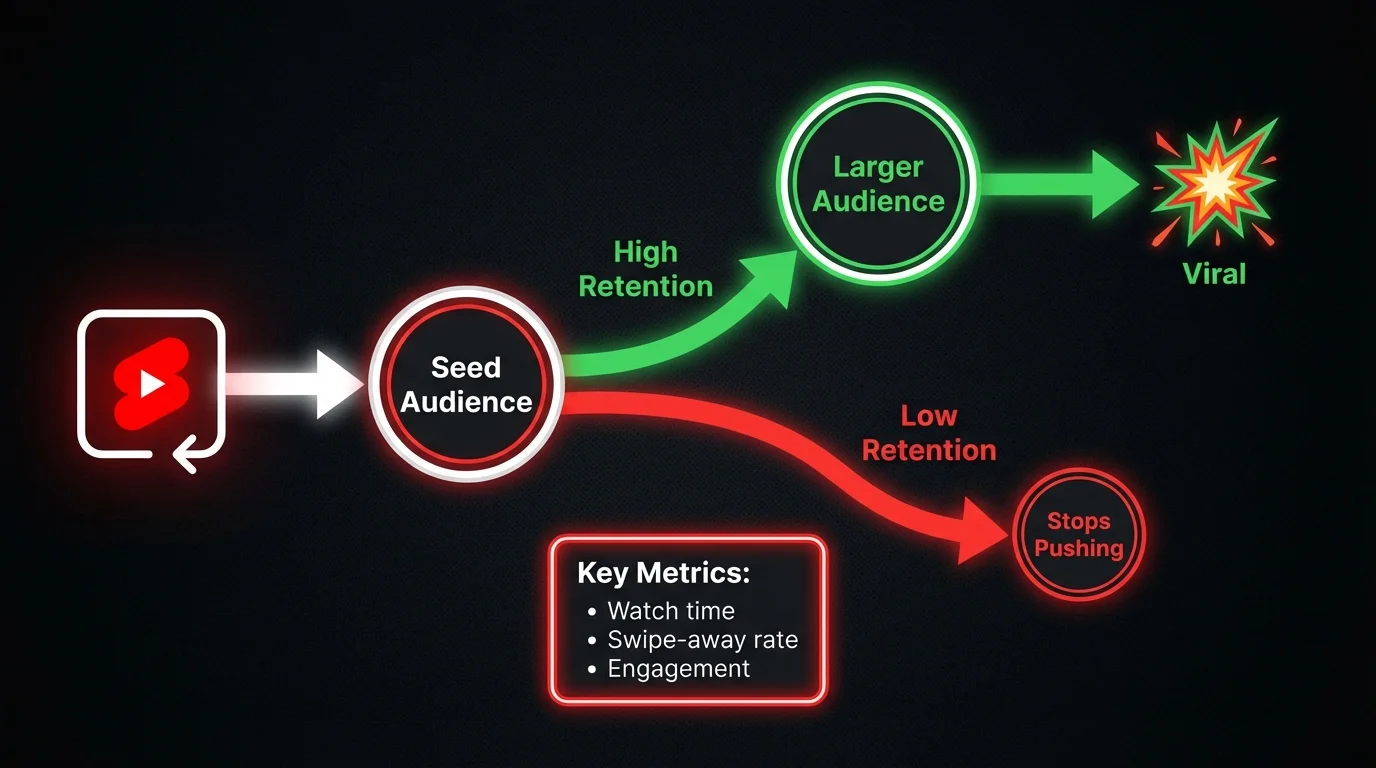
- Each Short is evaluated independently. YouTube tests every Short with a small seed audience. If that group engages strongly (high retention, low swipe-away rate), the algorithm pushes it wider. If not, it stops. Posting 10 Shorts a day won't help if none of them retain viewers.
- Frequency increases your chances. More Shorts means more opportunities for one to catch the algorithm's attention. It's a numbers game, but only if each attempt meets a quality threshold.
- Old Shorts can still go viral. Unlike some platforms, YouTube will recommend a Short posted weeks or months ago if it finds the right audience. YouTube continues distributing Shorts for up to 6 months after publishing, according to vidIQ's 2026 algorithm breakdown. Your archive of past Shorts continues working for you.
- 74% of Shorts views come from non-subscribers. Shorts are YouTube's primary discovery format. Every Short is essentially shown to people who've never heard of you.
- Consistency signals channel health. Channels that post regularly — even 3x per week — signal to YouTube that they're active and worth recommending. Sporadic posting (5 Shorts one week, zero the next) sends mixed signals.
The key metrics the algorithm evaluates: watch time percentage, swipe-away rate, likes, comments, and shares, and whether viewers click through to your channel or long-form content afterward. Shorts with 70%+ average watch time get pushed to significantly larger audiences.
For more on how the algorithm decides which Shorts to push, see our guide on the YouTube Shorts algorithm.
When to Scale Up or Cut Back
Your ideal posting frequency isn't static. It should change as your channel grows and your data tells you what's working. Here's how to read the signals.
Scale up when:
- Your average completion rate is above 70%. This means your content quality is strong enough to handle more volume without diluting engagement.
- You've maintained your current frequency for 90+ days. YouTube's algorithm takes 4-8 weeks to profile a channel's posting pattern. Switching frequency every 2 weeks gives you unreliable data. Commit to a frequency for at least 90 days before judging results.
- You have production capacity to spare. If you're batching content efficiently and have unused slots in your content calendar, adding one more Short per week is low-risk.
- Your subscriber growth has plateaued. When views are steady but subscribers flatten, more content gives the algorithm more entry points to your channel.
Cut back when:
- Average watch time is dropping. If your retention rate falls below 50%, you're producing more than you can maintain quality on. Fewer, better Shorts will outperform more mediocre ones.
- Engagement per video is declining. Track likes and comments per Short. If these drop as you post more, you've passed your quality ceiling.
- You're burning out. A creator who quits after 60 days of daily posting gets worse results than one who posts 3x per week for a year. Sustainability wins over intensity. According to FluxNote's research, 73% of channels that commit to daily posting reduce their frequency within 90 days.
Check your YouTube Analytics weekly to track these signals. The data will tell you exactly when to push harder and when to pull back.
Quality vs. Quantity: Finding the Balance
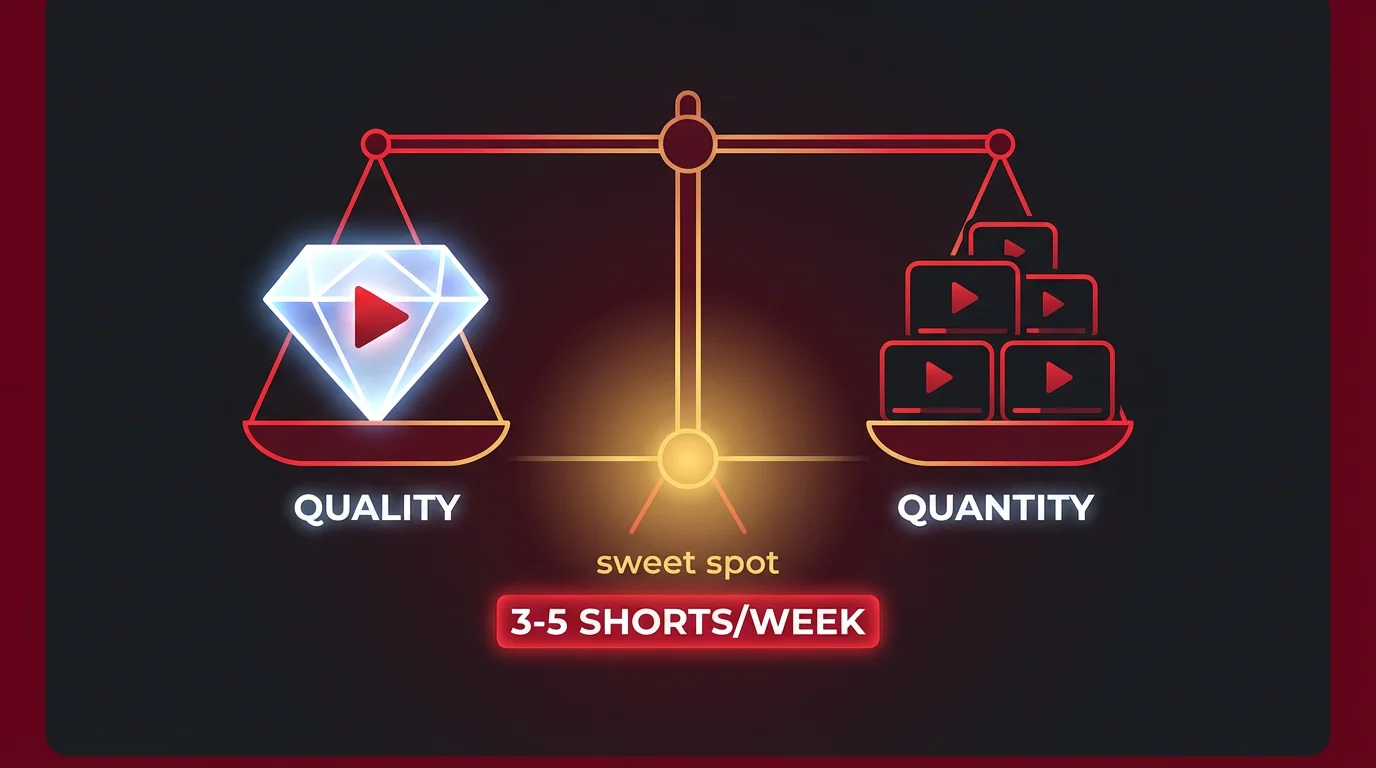
Volume without quality is spam. If you're producing lots of Shorts that don't get engagement, the algorithm starts ignoring your uploads. Low-retention videos signal to YouTube that your content isn't worth recommending.
Quality without volume is invisible. A well-made Short posted once a month won't build momentum. The algorithm rewards consistent signals of an active channel.
The practical balance for most creators:
- Set a sustainable baseline. Pick a frequency you can maintain for 3+ months without burnout. For most solo creators, that's 3-5 Shorts per week.
- Batch produce content. Film or generate 5-7 Shorts in one session, then schedule them throughout the week. This is far more efficient than creating one Short per day.
- Analyze and iterate. Check your YouTube Studio analytics weekly. Which Shorts had the highest retention? What topics, hooks, and lengths worked? Make more of those.
Use our Video Hook Generator to test different opening lines — the first 2 seconds determine whether viewers stay or swipe.
How Shorts Frequency Affects Monetization
If you're posting Shorts to earn revenue, frequency has a direct impact — but not in the way most creators expect.
YouTube Shorts RPM (revenue per 1,000 views) typically ranges from $0.01 to $0.10, compared to $2-$12 for long-form videos. That's a 10-30x revenue difference per view. At those rates, you need massive volume to generate meaningful ad revenue from Shorts alone.
| Monthly Shorts Views | Estimated Monthly Revenue (Shorts ads) |
|---|---|
| 100,000 | $1 - $10 |
| 1,000,000 | $10 - $100 |
| 10,000,000 | $100 - $1,000 |
The real monetization value of Shorts is as a subscriber funnel. Shorts drive discovery — 74% of views come from non-subscribers — and those new subscribers then watch your long-form content, which earns 10-30x more per view.
The most profitable strategy: post Shorts frequently to grow your audience, then monetize through long-form videos, products, or sponsorships. Many creators treat Shorts as free advertising for their main channel. A single viral Short can bring in thousands of subscribers who then generate consistent ad revenue through long-form watch time.
If you're eligible for the YouTube Partner Program, you can also earn from Shorts ads directly. YouTube pools ad revenue from the Shorts feed and distributes it based on your share of total Shorts views. Higher posting frequency means more total views, which means a larger share of the pool — but only if each Short performs well enough to get recommended.
Create Faceless Videos on Autopilot
FlowShorts generates and posts AI videos to YouTube, TikTok & Instagram while you sleep.
Try FlowShorts Free →Calculate your potential earnings with our YouTube Shorts Monetization Calculator or check your channel's RPM with the YouTube RPM Calculator.
For more on YouTube Shorts revenue, see our breakdown of YouTube Shorts earnings and how the YouTube Partner Program applies to short-form content.
Staying Consistent with Your Shorts Schedule
Posting 1-3 Shorts per day manually is unsustainable for most creators. The creators who maintain high-frequency output long-term use systems, not willpower.
Batch production sessions
Dedicate one focused session per week to producing the entire week's Shorts. A practical time breakdown for a 7-Short batch:
- 15 minutes: Select topics from your idea bank (keep a running list of 50+ ideas so you never start from zero)
- 45 minutes: Write scripts for all 7 Shorts
- 30 minutes: Record voiceovers or film footage
- 30 minutes: Edit and add captions
That's roughly 2 hours to produce a full week of content. Batching eliminates the daily context-switching that drains creative energy.
Schedule uploads in advance
Use YouTube Studio's built-in scheduler to queue uploads at your optimal posting times. This maintains a consistent cadence without requiring you to manually publish every day. For more details, see our guide on how to schedule YouTube Shorts.
Use AI video tools
If producing Shorts manually doesn't fit your schedule, AI tools can handle the entire pipeline. FlowShorts generates complete Shorts — script, AI voiceover, visuals, and TikTok-style captions — then auto-posts to YouTube, TikTok, and Instagram on your schedule. Plans start at $19/month for 8 videos, scaling up to 60 videos/month on the Pro plan.
Free YouTube Tools
- YouTube Shorts Ideas Generator — never run out of content ideas
- AI Video Script Generator — write scripts in seconds
- YouTube Title Generator — craft click-worthy titles
- YouTube Hashtag Generator — find trending hashtags
- YPP Eligibility Checker — check if you qualify for monetization
Common Questions
How Many YouTube Shorts Should I Post Per Day?
For most creators, 1-2 Shorts per day is the sweet spot. This gives the algorithm enough content to test while keeping quality high. If you're just starting, begin with 3-5 per week and scale up as you learn what works for your audience.
Can I Post Too Many YouTube Shorts?
Yes. Uploading more than 5-10 Shorts in a single day can trigger YouTube's spam detection and reduce visibility. Space uploads at least 2-3 hours apart. More importantly, posting many low-quality Shorts signals to the algorithm that your content isn't worth recommending.
Does Posting More Shorts Help the Algorithm?
Indirectly. Each Short is evaluated on its own merits. Posting more doesn't boost individual videos. But more Shorts means more chances for one to go viral. Think of it as increasing your sample size, not boosting your ranking.
Is One YouTube Short Per Day Enough?
One per day is a solid strategy for most growing channels. Daily posting builds algorithmic momentum and keeps your channel visible in the Shorts feed. It's better to post one quality Short daily than three mediocre ones.
What Is the Best Time to Upload YouTube Shorts?
The best times are 2-4 PM and 7-10 PM in your audience's timezone, with weekends generating up to 60% more views than weekdays. Use our Best Time to Post Calculator to find the optimal window for your specific audience.
How Do I Stay Consistent with YouTube Shorts?
Batch production and scheduling are the two most effective strategies. Dedicate 2 hours per week to creating 5-7 Shorts in one session, then schedule them across the week using YouTube Studio. AI video tools can also handle generation and auto-posting if you need to maintain daily output without daily production work.
Related Guides
- Best Time to Post YouTube Shorts
- How the YouTube Shorts Algorithm Works
- YouTube Shorts Earnings: How Much Can You Make?
- How to Schedule YouTube Shorts
- Best Hooks for Short-Form Videos
- How to Start a Faceless YouTube Channel
Compare YouTube Shorts Tools
Looking for the best tool to automate your Shorts posting schedule?
Need content ideas? Browse YouTube Shorts Ideas by Niche — 30+ niches with hooks and concepts.


