Sora AI Is Dead: 7 Best Alternatives for Video Generation in 2026
OpenAI shut down Sora AI in March 2026 due to deepfake concerns and unsustainable costs. Here are 7 alternatives for AI video generation, covering everything from cinematic text-to-video to automated faceless content creation.
FlowShorts Team
If you searched "Sora AI video generator," you're probably discovering that Sora no longer exists. OpenAI shut down both the Sora app and API in March 2026, citing deepfake concerns and unsustainable operating costs — reportedly $1M per day. But AI video generation didn't die with Sora. It's actually better than ever, with more specialized tools tackling different use cases. This guide covers 7 practical alternatives, organized by what you actually need — whether that's cinematic AI clips, automated faceless content, or AI avatar presenters.
What Happened to Sora?
Sora launched in December 2024 as OpenAI's flagship text-to-video model. It generated stunning cinematic clips that went viral instantly. For a brief window, it felt like the future of video had arrived overnight.
That future lasted about 15 months. In March 2026, OpenAI announced it was shutting down Sora — both the consumer app (which had become a social video-sharing platform) and the developer API.
The official reason was deepfake and nonconsensual content concerns. Despite watermarking and content filters, users found ways to generate realistic videos of real people. The moderation problem proved intractable at scale.
But there was a financial reality too. Running Sora's inference infrastructure reportedly cost OpenAI around $1 million per day, and the revenue from Sora subscriptions never came close to covering it. The economics simply didn't work.
The official Sora page now redirects to OpenAI's main site. The underlying model technology may eventually resurface inside ChatGPT or future OpenAI products, but the standalone Sora product is gone for good.
7 Best Sora Alternatives for AI Video Generation
Not every creator needs the same thing from an AI video tool. Some of you want raw cinematic clips for creative projects. Others want a complete video pipeline that handles everything from script to posting. Here's how the best alternatives break down by use case.
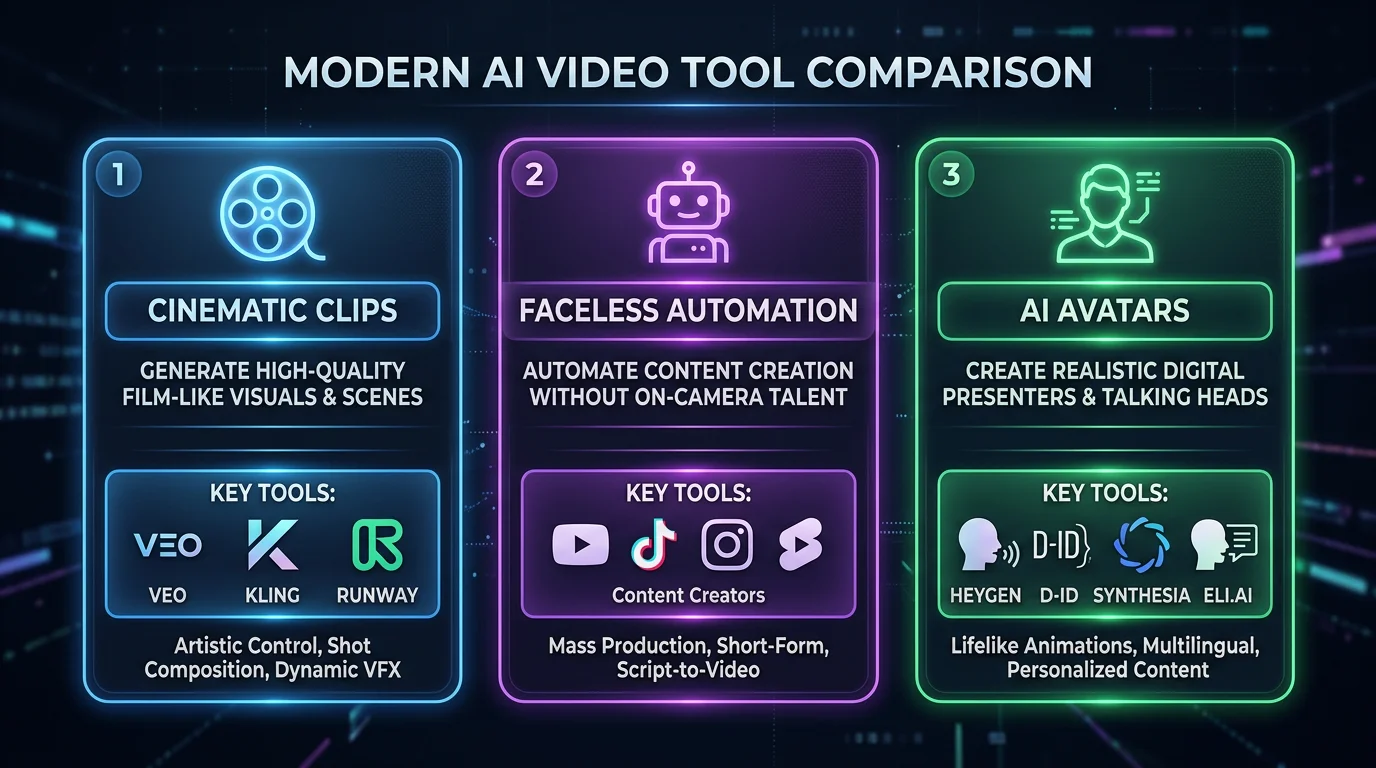
For Cinematic AI Video Clips
These tools are the closest to what Sora actually did — generating short, visually impressive video clips from text prompts.
1. Google Veo 3
Google's latest video generation model is the most direct successor to what Sora offered. Veo 3 generates 8-second cinematic clips with synchronized audio, and the visual quality is genuinely impressive — often surpassing what Sora could produce at its peak.
You can access Veo 3 through Google AI Studio for free, which makes it the most accessible option on this list. The clips it produces have smooth motion, coherent physics, and surprisingly good understanding of spatial relationships.
Best for: Creators who want high-quality cinematic clips for film projects, social media teasers, or creative experimentation.
Limitations: Clips are limited to 8 seconds. There's no editing timeline, no audio narration, and no way to stitch clips into full videos within the tool. You'll need a separate editor for anything longer than a single shot.
Pricing: Free via Google AI Studio.
2. Kling AI
Kling AI has quietly become one of the most capable video generation models available. Developed by Kuaishou (the company behind the Kwai app), Kling generates 5-10 second clips from text or image inputs with remarkably realistic motion.
Where Kling really shines is human motion. It handles walking, gesturing, and facial expressions better than Sora ever did. If your use case involves people — even AI-generated ones — Kling produces the most natural-looking results right now.
Best for: Creators who need realistic human motion in AI-generated clips, or who want to animate still images into video.
Limitations: Like Veo 3, clips are short. There's no built-in editing, no narration, and no auto-posting to social platforms. It's a clip generator, not a video production tool.
Pricing: Credits-based system with a free tier. Paid plans for higher resolution and faster generation.
3. Runway Gen-3
Runway has been in the AI video space longer than almost anyone. Gen-3 is their latest model, and it comes with the most professional editing environment of any tool on this list.
What sets Runway apart is the full creative suite around the video generation. You get text-to-video, image-to-video, video-to-video style transfer, inpainting, and a timeline editor. If you're a professional video editor who wants AI as a tool in your existing workflow, Runway fits best.
Best for: Professional video editors and creative agencies who want AI-assisted tools within a familiar editing interface.
Limitations: It's the most expensive option for high-volume use. Generated clips are 5-15 seconds. There's no auto-posting or content automation — this is a creative tool, not a content engine.
Looking for the Best Faceless Video Tool?
See why creators are switching to FlowShorts — AI video generation + auto-posting to 3 platforms from $19/mo.
Compare Plans →Pricing: From $12/month. Credits deplete quickly with high-quality generation.
For Automated Faceless Content (Short-Form)
If you're not looking for raw AI clips but instead want complete, ready-to-post videos, these tools take a fundamentally different approach. They handle the entire pipeline — scripting, visuals, voiceover, captions, and publishing.
4. FlowShorts
FlowShorts takes a completely different approach to AI video. Instead of generating cinematic clips, it builds complete 60-second narrated videos — with AI-generated scripts, images, ElevenLabs voiceover, TikTok-style captions, and background music — then auto-posts them to YouTube Shorts, TikTok, and Instagram Reels on a daily schedule.
Think of it as the difference between a camera and a TV studio. Sora was a camera — it gave you raw footage. FlowShorts is a studio — it produces finished content and handles distribution.
You pick a niche (motivation, finance, tech, fitness, etc.), connect your social accounts, and the system generates and posts videos automatically. No editing required.
Best for: Creators and businesses who want consistent faceless content posted to multiple platforms daily without manual effort.
Limitations: This is a faceless content tool, not a cinematic clip generator. You can't edit frame-by-frame or create custom visual compositions. If you need raw AI footage for a film project, this isn't it.
Pricing: From $19/month (Starter plan with 8 videos/month). Creator plan at $39/month for daily posting.
5. InVideo AI
InVideo AI sits between a clip generator and a full automation tool. You type a prompt describing the video you want, and it assembles a complete video using stock footage, AI narration, text overlays, and transitions.
The results look polished and professional. InVideo supports multiple languages and lets you edit the generated video in a browser-based editor if you want to make changes. It's the closest thing to a "type and get a video" experience for longer-form content.
Best for: Creators who want prompt-based full video creation with the option to edit afterward, especially for YouTube or social media.
Limitations: Videos use stock footage rather than AI-generated visuals, so they can feel generic if you're not careful with prompts. There's no auto-posting — you download and upload yourself.
Pricing: Free tier with watermark. Paid plans from $25/month.
For AI Avatars & Presenters
If your use case involves a talking presenter — training videos, product demos, sales outreach — these avatar-based tools are more practical than anything Sora offered.
6. Synthesia
Synthesia is the industry leader in AI avatar video creation. It offers 230+ AI avatars that speak in over 140 languages, making it the go-to choice for corporate training, internal communications, and localized explainer videos.
You write a script, choose an avatar and language, and Synthesia renders a video of the avatar presenting your content with natural lip-sync and gestures. The quality is good enough that major enterprises use it for customer-facing content.
Best for: Companies creating training videos, onboarding content, product explainers, and multilingual business communications.
Limitations: The avatars still look like AI avatars — they won't pass for real humans in most contexts. It's not designed for short-form social content, and the per-video costs add up for high-volume creators.
Pricing: From $22/month for the Starter plan.
7. HeyGen
HeyGen focuses on personalized AI avatar videos with two standout features: high-quality lip-sync and voice cloning. You can create a digital twin of yourself (or use a stock avatar) and generate videos where the avatar speaks with your actual voice.
This makes HeyGen particularly powerful for sales outreach and product demos. Imagine sending personalized video messages to prospects at scale, each one featuring "you" speaking directly to them by name.
Best for: Sales teams, product marketers, and anyone who needs personalized presenter-style videos at scale.
Looking for the Best Faceless Video Tool?
See why creators are switching to FlowShorts — AI video generation + auto-posting to 3 platforms from $19/mo.
Compare Plans →Limitations: Like Synthesia, it's focused on business use cases. Not designed for social media content creation or short-form viral videos. Voice cloning requires initial setup.
Pricing: From $24/month.
Sora Alternatives Comparison Table
| Tool | Type | Video Length | Auto-Post | Free Tier | Price |
|---|---|---|---|---|---|
| Google Veo 3 | Cinematic clips | 8 seconds | No | Yes | Free (AI Studio) |
| Kling AI | Cinematic clips | 5-10 seconds | No | Yes | Credits-based |
| Runway Gen-3 | Cinematic clips | 5-15 seconds | No | Limited | $12/mo |
| FlowShorts | Faceless automation | 60s full videos | Yes (3 platforms) | No | $19/mo |
| InVideo AI | Stock video generator | 1-15 minutes | No | Yes (watermark) | $25/mo |
| Synthesia | AI avatars | 1-30 minutes | Yes | Limited | $22/mo |
| HeyGen | AI avatars | 1-10 minutes | Yes | Limited | $24/mo |
Which Sora Alternative Should You Choose?
The right tool depends entirely on what you're trying to accomplish. Here's a quick decision guide:
Want cinematic AI clips for film or creative work? Start with Google Veo 3 (it's free) or Kling AI (best human motion). These are the closest to what Sora offered.
Want to create full videos from a text prompt? InVideo AI assembles complete videos with stock footage, narration, and editing tools. Good for YouTube content and marketing videos.
Want automated faceless content posted daily? FlowShorts handles the entire pipeline from script to auto-posting. Set it up once and get daily content on YouTube Shorts, TikTok, and Instagram Reels.
Want AI presenter or avatar videos? Synthesia for corporate and training content. HeyGen for personalized sales videos with voice cloning.
Want professional video editing with AI assists? Runway Gen-3 gives you the most control with a full creative suite built around AI generation.
Most creators will find that a specialized tool actually serves them better than Sora ever did. Sora tried to be a general-purpose video generator, but most people don't need raw AI footage — they need finished content. The alternatives reflect that reality.
Will Sora Come Back?
OpenAI hasn't completely ruled out bringing the technology back in some form. The most likely scenario is that Sora's model capabilities get folded into ChatGPT — imagine generating a quick video clip mid-conversation the way you currently generate images with DALL-E.
But the standalone Sora app and API? Those are dead. OpenAI learned that running an open-ended video generation platform creates moderation problems they can't solve at scale — at least not without burning through cash at an unsustainable rate.
Our advice: don't wait. The alternatives listed above are already more practical than Sora was for most real-world use cases. Whether Sora returns in some form or not, these tools are where the actual work is getting done in 2026.
Frequently Asked Questions
Why did OpenAI shut down Sora?
OpenAI cited deepfake and nonconsensual content concerns as the primary reason. Users were generating realistic videos of real people despite content filters. The financial burden was also a factor — Sora reportedly cost around $1 million per day to operate, and subscription revenue didn't come close to covering it.
Is there a free Sora alternative?
Yes. Google Veo 3 is available for free through Google AI Studio and produces high-quality cinematic clips. Kling AI also offers a free tier with credits. InVideo AI has a free plan with watermarked exports. For full video automation, most tools require a paid subscription.
What is the best AI video generator in 2026?
It depends on your use case. For cinematic clips, Google Veo 3 leads in quality. For automated short-form content, FlowShorts handles the full pipeline including auto-posting. For AI avatars, Synthesia is the industry standard. Check our complete guide to AI video generators for a broader comparison.
Can I still access Sora videos I created?
OpenAI provided a download window before the shutdown. If you didn't download your videos during that period, they are no longer accessible. The Sora app and all user-generated content have been taken offline permanently.
What replaced Sora for text-to-video?
Google Veo 3 and Kling AI are the most direct replacements for Sora's core text-to-video capability. For broader video creation needs, tools like FlowShorts, InVideo AI, Synthesia, and HeyGen each handle specific use cases that Sora was never designed for. See our text-to-video AI guide for a deeper dive.
The Bottom Line
Sora was a groundbreaking demo that proved AI video generation was possible at a quality level nobody expected. But it was also a product that couldn't sustain itself — not financially, and not from a safety perspective.
The good news is that the alternatives are more practical for actual creators. Instead of one tool trying to do everything, you now have specialized tools that do specific things extremely well. Cinematic clips, faceless automation, avatar presenters — pick the tool that matches your actual workflow.
For the full landscape of what's available, check out our complete guide to the best AI video generators. And if you want to learn the fundamentals, start with our guide on how to make AI videos.
Free Tools to Get Started
- AI Video Script Generator — Generate scripts for short-form videos in seconds
- AI Image to Video Guide — Learn how to turn still images into animated video clips
- Best AI Tools for Faceless Reels — Our curated list for faceless content creators


