Can ChatGPT Generate Videos? (3 Methods That Work in 2026)
3 proven methods to use ChatGPT for video generation in 2026. Covers ChatGPT GPT Store video tools, using ChatGPT as a scriptwriter for external AI tools, and fully automated video pipelines.
FlowShorts Team

Can ChatGPT make videos? The answer is more nuanced than a simple yes or no. ChatGPT itself is a large language model — it processes and generates text, not video. And if you remember OpenAI''s Sora, the text-to-video model that was briefly available inside ChatGPT, it was shut down in March 2026. So ChatGPT can''t render video frames on its own. But that does not mean ChatGPT is useless for video creation. In fact, it can generate videos through three different methods: built-in GPT Store tools, script generation paired with external platforms, and fully automated pipeline orchestration. This guide walks through all three with step-by-step instructions so you can pick the approach that fits your workflow.
Can ChatGPT Actually Generate Videos?
The short answer: not directly. ChatGPT is a text-based AI. It cannot render frames, produce audio, or export an MP4 file by itself. What it can do is connect to tools that handle those steps, or produce the scripts and creative assets that feed into video production software. Think of ChatGPT as the brain that plans the video — it still needs hands (other tools) to actually build it. Below are three methods ranked from most integrated to most automated.
Method 1 — ChatGPT GPT Store Video Tools
The most accessible way to generate videos with ChatGPT is through third-party GPTs available in the GPT Store. These are custom ChatGPT integrations built by external companies that let you create videos without leaving the ChatGPT interface. Two tools dominate this category.
InVideo GPT
InVideo GPT is the most popular video generation GPT in the ChatGPT store. It connects ChatGPT''s language capabilities with InVideo''s video editor, stock library, and text-to-speech engine. You type a prompt, and it returns a complete video with stock footage, transitions, and voiceover.
Step-by-step process:
- Open ChatGPT (requires ChatGPT Plus, $20/month)
- Click "Explore GPTs" in the sidebar
- Search for "InVideo AI" and open the GPT
- Type your video prompt — be specific about topic, length, and style (e.g., "Create a 60-second motivational video about overcoming procrastination with an upbeat tone")
- InVideo GPT generates the video and returns a preview link
- Click the link to open the video in InVideo''s editor where you can adjust clips, text, music, and voiceover
- Export the final video
Pros:
- Seamless experience inside ChatGPT — no switching between apps
- Natural language prompting makes it beginner-friendly
- Access to InVideo''s stock footage library (millions of clips and images)
- You can iterate by chatting — "make it shorter," "change the music to something calmer"
Cons:
- Relies entirely on stock footage — no AI-generated visuals or custom images
- Free InVideo plan adds a watermark to exports
- No auto-posting to YouTube, TikTok, or Instagram
- Requires ChatGPT Plus subscription ($20/month) plus an InVideo plan for watermark-free exports
- Limited creative control compared to dedicated video editors
Video GPT by VEED
VEED''s GPT follows a similar model. You describe the video you want, and it generates a short visual video using VEED''s online video editor and stock library. It tends to work better for short-form social clips — think 15- to 30-second videos optimized for vertical formats.
Pros:
- Good for quick social media clips
- Clean, modern templates
- Auto-generated subtitles (VEED is known for its caption tool)
Cons:
- Less customization than InVideo GPT
- Smaller stock library
- Also requires ChatGPT Plus
- Free VEED plan is limited in export quality and features
Create Faceless Videos on Autopilot
FlowShorts generates and posts AI videos to YouTube, TikTok & Instagram while you sleep.
Try FlowShorts Free →Bottom line on Method 1: GPT Store video tools are the easiest entry point. If you already pay for ChatGPT Plus and want a quick video, InVideo GPT is a solid choice. But you are limited to stock footage, you pay for two subscriptions, and there is no automation — every video requires a manual prompt and export.
Method 2 — ChatGPT as Scriptwriter + External Tools
If you want more creative control, you can use ChatGPT purely as a scriptwriter and then produce the video with specialized tools. This is the approach most professional creators use because it gives you control over every element: script, visuals, voice, and editing.
The workflow:
- ChatGPT writes the script. Use the free tier of ChatGPT or Plus — either works. Prompt it with your topic, target length, and format. For example: "Write a 60-second YouTube Shorts script about 5 habits of millionaires. Include scene descriptions and narration text for each scene." For detailed scripting tips, see our guide on writing scripts for YouTube videos.
- ElevenLabs generates the voiceover. Copy the narration text from ChatGPT''s script, paste it into ElevenLabs, pick a voice, and generate the audio file. ElevenLabs offers realistic AI voices in dozens of languages.
- Midjourney or Flux generates the visuals. Use the scene descriptions from ChatGPT''s script as image prompts. Generate one image per scene to create a visual storyboard.
- CapCut or DaVinci Resolve assembles the final video. Import your images, voiceover audio, and add background music. Arrange scenes to match the narration timing, add captions, transitions, and effects. Export as a 1080x1920 MP4 for Shorts/Reels/TikTok.
Pros:
- Maximum creative control over every element
- Free ChatGPT works for scripting — no Plus subscription required
- AI-generated images instead of generic stock footage
- Professional-quality output when done well
- You own every asset and can reuse them
Cons:
- Manual workflow — you are juggling 4 separate tools
- Time-consuming: expect 30 to 60 minutes per video
- Requires basic video editing skills
- No automation — every video is a manual project
- Individual tool costs add up (ElevenLabs, Midjourney, etc.)
Best for: Creators who want full control over every element and don''t mind spending time on each video. This method produces the highest quality results but scales poorly if you need daily content.
Method 3 — Fully Automated Pipelines
The third approach skips ChatGPT entirely. Instead of using ChatGPT as a component, you use platforms that have large language models built in and handle the entire video pipeline — scripting, image generation, voiceover, captions, rendering, and even posting. These tools do what ChatGPT does (generate scripts) plus everything else, in one automated workflow.
Notable tools in this category:
- FlowShorts: Generates the script using AI, creates custom images for each scene, produces voiceover, adds TikTok-style animated captions, renders the video, and auto-posts to YouTube Shorts, TikTok, and Instagram Reels on a schedule. You pick a niche and it produces videos daily on autopilot.
- InVideo AI (standalone): The same company behind the ChatGPT GPT, but their standalone platform accepts a text prompt and produces a complete video with stock footage and voiceover — no ChatGPT needed.
- AutoShorts: Similar concept — enter a topic and it generates a short-form video ready for posting.
For a deeper comparison of these tools, see our roundup of the best faceless video generators with auto-posting.
Pros:
- One tool handles the entire pipeline — no juggling multiple platforms
- Auto-posting to social platforms saves time and ensures consistency
- Daily content generation on autopilot
- No video editing skills required
- AI-generated images instead of stock footage (on some platforms)
Cons:
- Less creative control over individual videos
- Monthly subscription cost
- Output quality varies by platform
- You are trusting the AI''s creative judgment for scripting and visuals
Create Faceless Videos on Autopilot
FlowShorts generates and posts AI videos to YouTube, TikTok & Instagram while you sleep.
Try FlowShorts Free →Best for: Creators who want daily content without spending time editing. If your goal is consistent output across YouTube Shorts, TikTok, and Reels with minimal effort, an automated pipeline is the most efficient method.
Which Method Should You Choose?
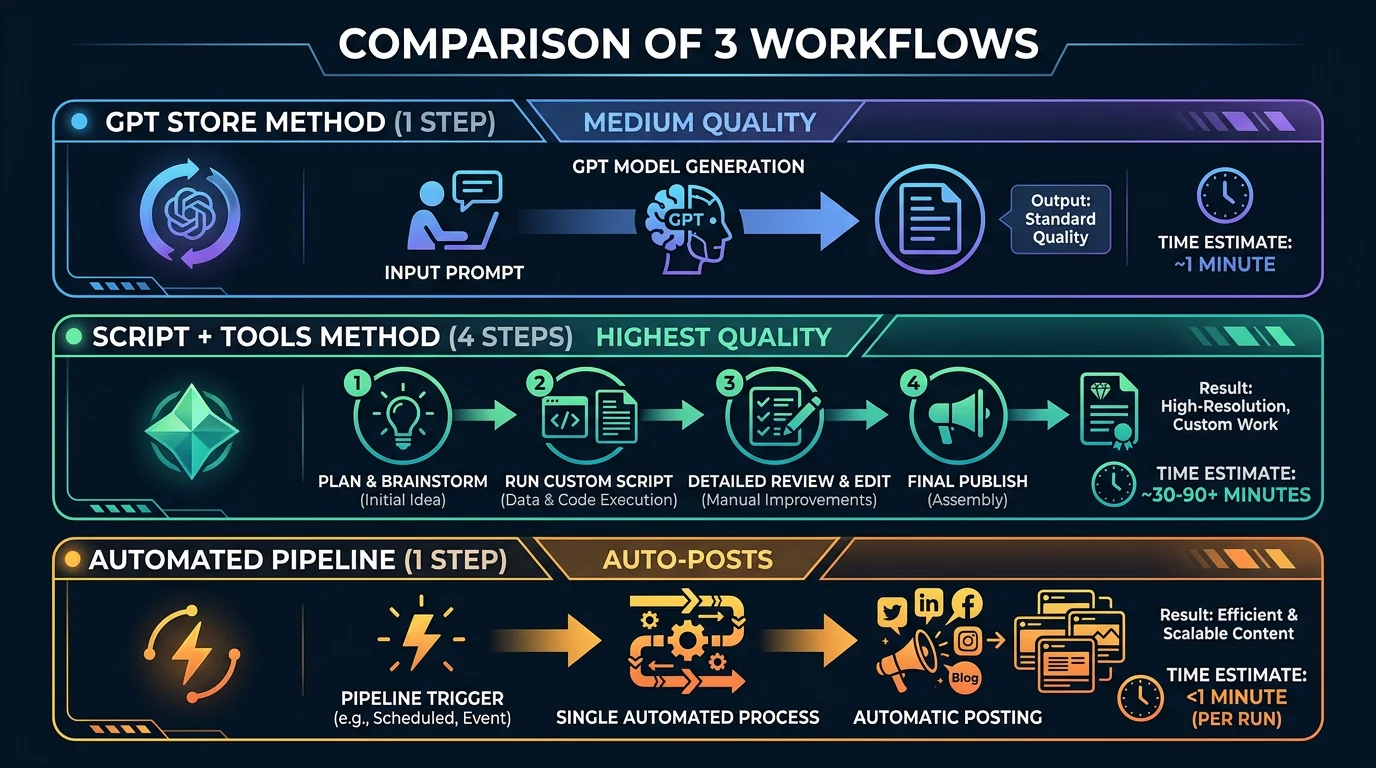
The right approach depends on your goals, budget, and how much time you want to spend per video. Here is a side-by-side comparison:
| Method | Time Per Video | Cost | Quality | Auto-Post | Best For |
|---|---|---|---|---|---|
| GPT Store Tools (InVideo GPT, VEED) | 5-10 min | $20/mo (ChatGPT Plus) + tool plan | Medium (stock footage) | No | Quick one-off videos |
| ChatGPT Scripting + External Tools | 30-60 min | Free ChatGPT + individual tool costs | High (full control) | No | Quality-focused creators |
| Fully Automated Pipelines | 0 min (automated) | $19-69/mo | Medium-High (AI-generated) | Yes | Daily content at scale |
If you are just getting started and want to experiment, Method 1 (GPT Store tools) is the lowest-friction entry point. If you care deeply about quality and have time to invest, Method 2 (ChatGPT scripting) gives you the most control. If you want to publish daily without touching a video editor, Method 3 (automated pipelines) is the most practical long-term solution.
ChatGPT Video Prompts That Work
Regardless of which method you choose, the quality of your prompt determines the quality of your output. Here are five proven prompts you can copy and adapt:
- YouTube Shorts explainer: "Create a 60-second YouTube Short explaining why most people fail at budgeting. Use a conversational, slightly humorous tone. Include 6 scenes with narration and visual descriptions for each scene."
- Faceless motivation reel: "Write a script for a 45-second faceless Instagram Reel about the power of waking up at 5 AM. Dark, cinematic tone. Each scene should have a short punchy line of narration and a description of a dramatic landscape image."
- Product demo video: "Generate a 90-second product demo video for a project management app called TaskFlow. Highlight three key features: drag-and-drop boards, time tracking, and team chat. Professional tone with upbeat background music."
- Text-to-video explainer: "Make a 60-second explainer video about how compound interest works. Target audience: people aged 20-30 who are new to investing. Use simple language and visual metaphors like snowballs growing."
- TikTok comparison video: "Create a TikTok-style video comparing three AI writing tools: ChatGPT, Claude, and Gemini. 60 seconds, fast-paced, with text overlays showing pros and cons of each. End with a clear recommendation."
Prompt tips: Always specify the video length, target platform (YouTube Shorts, TikTok, Reels), tone, and number of scenes. The more specific your prompt, the better the output. For more scripting guidance, check out our free video script generator tool.
Frequently Asked Questions
Can ChatGPT create videos for free?
Partially. You can use free ChatGPT to write video scripts (Method 2), which costs nothing. However, GPT Store video tools (Method 1) require ChatGPT Plus at $20/month. The external tools you pair with ChatGPT — ElevenLabs, Midjourney, CapCut — have their own free tiers with limitations. For a completely free workflow, use free ChatGPT for scripting, a free TTS tool for voiceover, and CapCut''s free plan for editing.
What happened to Sora video generation in ChatGPT?
OpenAI launched Sora, a text-to-video AI model, and briefly integrated it into ChatGPT. However, Sora was shut down in March 2026 due to a combination of high computational costs, content moderation challenges, and strategic reprioritization. As of now, ChatGPT cannot generate video natively. For alternatives to Sora, see our Sora alternatives guide.
What is the best ChatGPT video generator?
For videos made inside ChatGPT, InVideo GPT is the most capable option in the GPT Store. For the best overall video generation experience (not limited to ChatGPT), fully automated tools tend to produce more consistent results. See our best AI video generators roundup for a full comparison.
Can I use ChatGPT to make YouTube Shorts?
Yes. ChatGPT can write scripts optimized for the 60-second YouTube Shorts format, and GPT Store tools like InVideo GPT can produce complete Shorts-ready videos. For a deeper guide on AI-generated videos, including Shorts-specific tips, check our dedicated article.
Is ChatGPT Plus required for video generation?
It depends on the method. GPT Store video tools (InVideo GPT, VEED GPT) require ChatGPT Plus ($20/month) because custom GPTs are a Plus feature. However, using ChatGPT as a scriptwriter (Method 2) works with the free tier. And fully automated pipelines (Method 3) don''t use ChatGPT at all — they have their own built-in AI, so no ChatGPT subscription is needed.
Conclusion
ChatGPT can''t render video by itself, but it remains one of the most useful tools in a video creator''s toolkit — whether you use it through GPT Store integrations, as a scriptwriter, or simply understand that the same AI scripting technology powers dedicated video platforms. The method you choose comes down to how much time you want to spend and how much control you need.
For most creators looking to build a consistent content schedule, the sweet spot is either Method 2 (if you enjoy the editing process) or Method 3 (if you want automation). Tools like FlowShorts exist specifically to handle the full pipeline so you can focus on strategy rather than production.
Whichever path you pick, start with one video. Test the workflow, evaluate the quality, and iterate from there. For more on AI video creation, explore our guides on how to make AI videos and text-to-video AI tools.