Instagram Reels Size & Dimensions: Complete Specs Guide (2026)
Instagram Reels size is 1080x1920 pixels (9:16). Complete guide to dimensions, safe zones, cover photos, export settings, and cross-platform sizing for Reels, Stories, and Feed.
FlowShorts Team
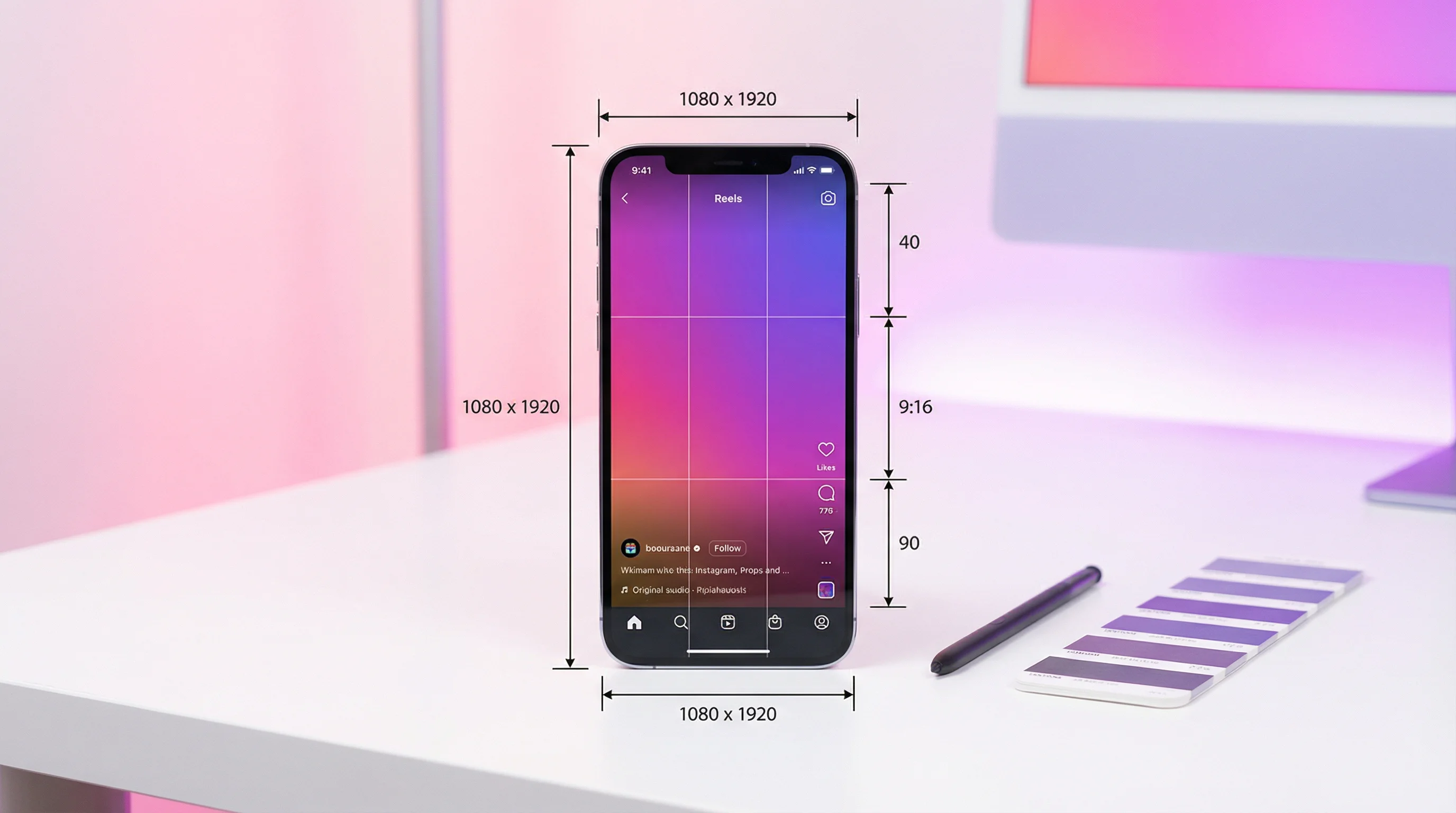
The ideal Instagram Reels size is 1080 × 1920 pixels in a 9:16 aspect ratio. That's full HD vertical — the same resolution used by YouTube Shorts and TikTok. Getting this right means your Reel looks sharp on every device and doesn't get cropped or letterboxed.
This guide covers every spec, safe zones for text, cover photo dimensions, file limits, and common mistakes that make Reels look amateur.
Instagram Reels Dimensions (2026)
| Specification | Requirement |
|---|---|
| Resolution | 1080 × 1920 pixels |
| Aspect ratio | 9:16 (vertical) |
| Frame rate | 30 fps (recommended) |
| Video format | MP4 or MOV |
| Maximum file size | 4 GB |
| Maximum length | 3 minutes (previously 90 seconds) |
| Minimum length | 3 seconds |
| Codec | H.264 (recommended) |
Instagram accepts other resolutions, but anything that isn't 9:16 gets cropped or letterboxed. A 16:9 horizontal video uploaded as a Reel will have large black bars above and below. A 1:1 square video gets cropped on the sides. Always shoot and export in 9:16 natively.
How Instagram Displays Reels in Different Contexts
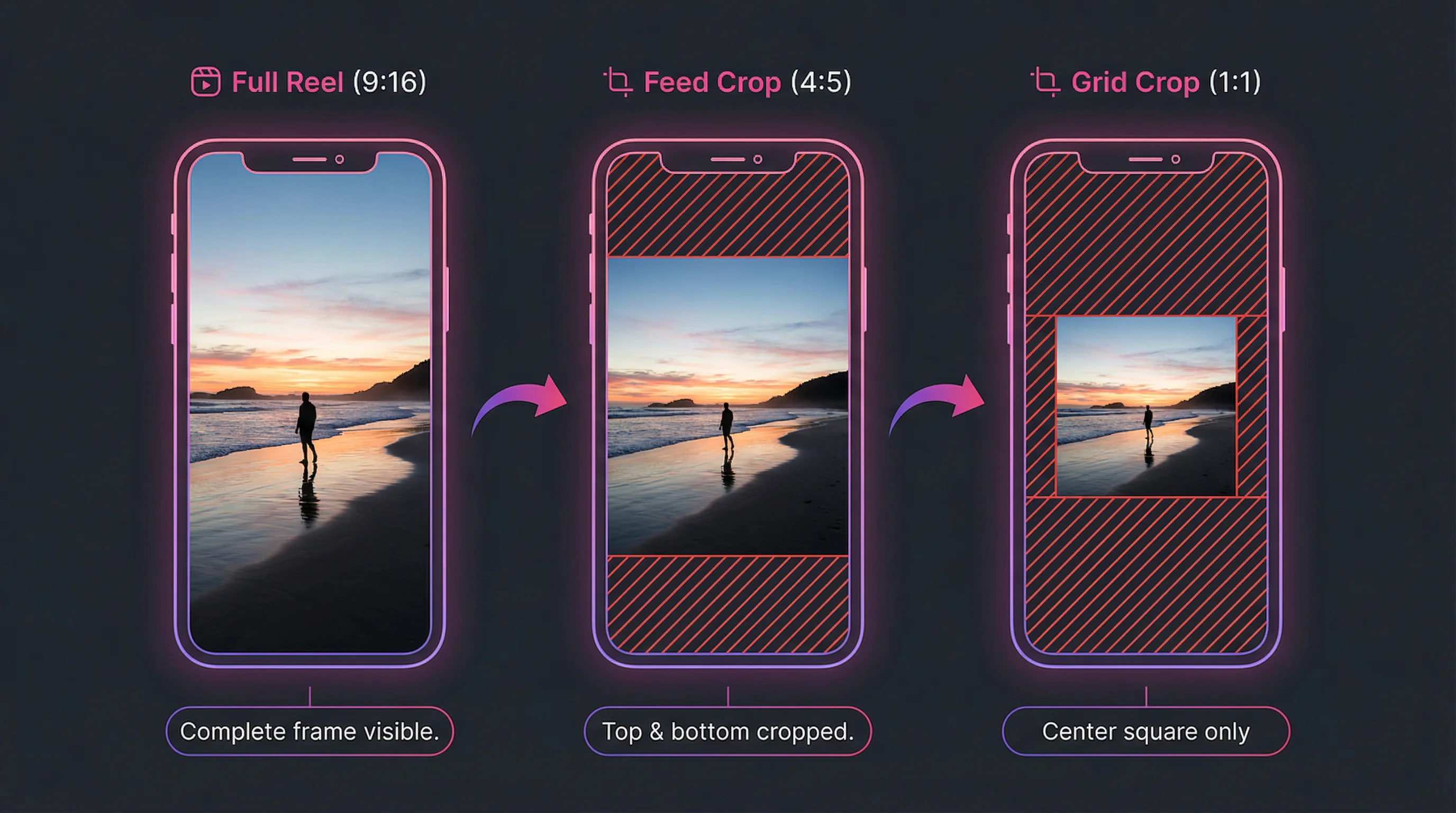
Your Reel appears at different sizes and crops depending on where a viewer sees it. Designing for the most restrictive context ensures it looks good everywhere.
| Context | Display | What to Watch |
|---|---|---|
| Reels tab (full screen) | Full 9:16 (1080×1920) | Everything visible — this is the primary view |
| Feed (in-feed Reel) | 4:5 crop (1080×1350) | Top and bottom ~15% cropped — keep critical content centered |
| Profile grid | 1:1 square crop (1080×1080) | Only the center square shows — text at top/bottom invisible |
| Explore page | 9:16 thumbnail (variable size) | Small preview — needs bold visuals to stand out |
| Stories share | Full 9:16 | Same as Reels tab — full frame visible |
Critical insight: The profile grid shows a 1:1 center crop of your Reel. If your cover image or opening frame has text at the very top or bottom, it gets cut off on your profile. Design your most important visual elements in the center 60% of the frame.
Reels Safe Zones
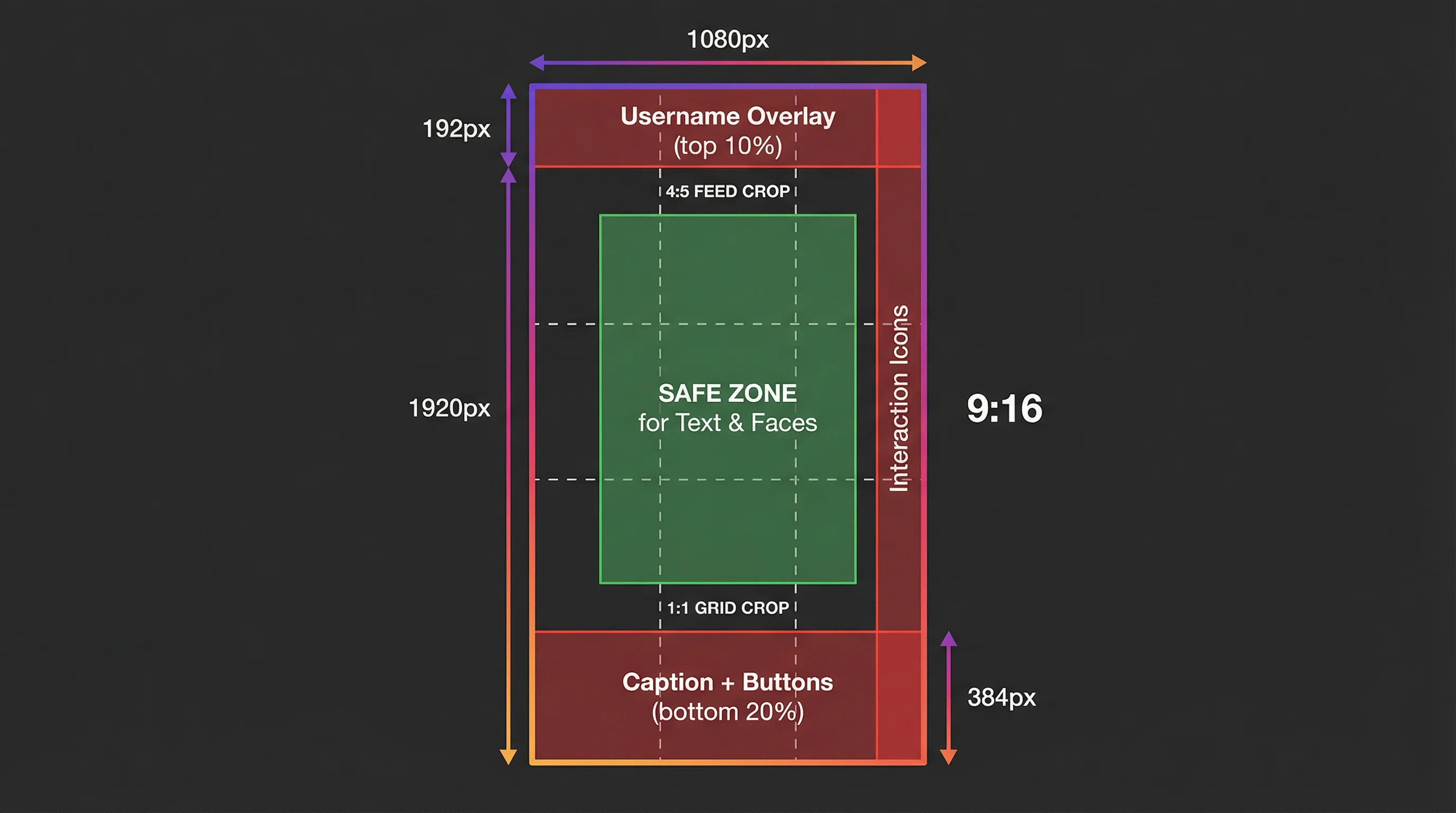
Instagram overlays UI elements on your Reel during playback. Design around these zones:
- Top 10%: Your username, "Follow" button, and the three-dot menu appear here. Avoid placing text or critical visuals in the top 200 pixels.
- Bottom 20%: Caption text, hashtags, audio attribution, and interaction buttons (like, comment, share, save) overlay this area. Keep essential content above the bottom 380 pixels.
- Right edge: The like, comment, share, and save buttons sit along the right edge. Don't place text or faces in the rightmost 10%.
The safe zone for text and key visuals: A rectangle roughly 900 × 1200 pixels centered in the frame. All text overlays, faces, and critical visual elements should stay within this zone.
Safe Zone Comparison Across Platforms
| Platform | Resolution | Top Unsafe | Bottom Unsafe | Side Unsafe |
|---|---|---|---|---|
| Instagram Reels | 1080×1920 | ~200px | ~380px | ~100px right |
| YouTube Shorts | 1080×1920 | ~200px | ~300px | Minimal |
| TikTok | 1080×1920 | ~150px | ~350px | ~100px right |
If you're posting the same video across all three platforms (which you should for maximum reach), design for Instagram's safe zone — it's the most restrictive. Content that looks good on Reels will look good on Shorts and TikTok too.
For YouTube Shorts specs, see our YouTube Shorts dimensions guide. For Reels length limits, see our Instagram Reels length guide.
Create Faceless Videos on Autopilot
FlowShorts generates and posts AI videos to YouTube, TikTok & Instagram while you sleep.
Try FlowShorts Free →Reels Cover Photo Dimensions
The cover photo is the thumbnail that represents your Reel on your profile grid and in some feed placements.
| Specification | Details |
|---|---|
| Upload size | 1080 × 1920 px (same as the Reel) |
| Profile grid crop | Center 1080 × 1080 px (1:1 square) |
| Format | Select from video frame or upload custom image |
When choosing a cover:
- Pick a frame (or design a custom cover) where the most important visual sits in the center square
- Add text to the cover that describes the Reel's content — this acts like a thumbnail on your profile grid
- Use consistent fonts, colors, and layout across covers to build a branded grid aesthetic
- Avoid text in the top or bottom quarter — it gets cropped on the profile grid
Export Settings for Instagram Reels
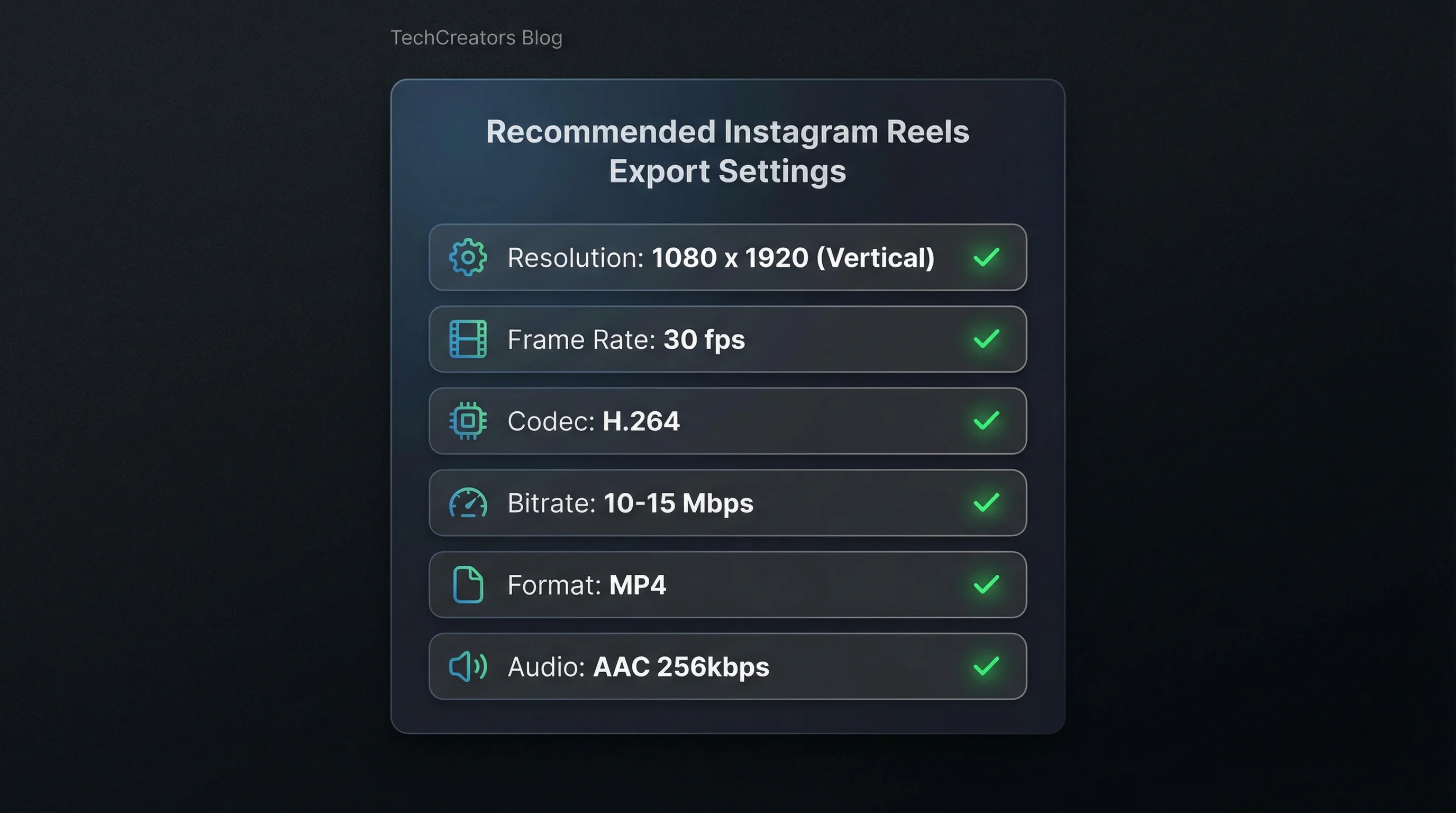
Recommended export settings from your video editor:
| Setting | Recommended Value |
|---|---|
| Resolution | 1080 × 1920 |
| Aspect ratio | 9:16 |
| Frame rate | 30 fps |
| Codec | H.264 |
| Bitrate | 10-15 Mbps (higher = better quality, larger file) |
| Format | MP4 |
| Audio | AAC, 128-256 kbps |
Instagram re-encodes every video you upload regardless of your export settings. But starting with high-quality source footage (10+ Mbps bitrate) ensures the re-encoded version still looks sharp. Uploading a low-bitrate file results in visible compression artifacts after Instagram's re-encoding.
For planning video duration before export, our video length calculator and speech time calculator help match narration to target Reel length.
Common Reels Size Mistakes
- Uploading horizontal video. A 16:9 video becomes a tiny strip in the middle of the 9:16 frame with massive black bars. Always shoot vertical or re-frame in your editor.
- Text in the bottom 20%. Captions, hashtags, and buttons cover this area. Your carefully placed text becomes unreadable behind Instagram's UI.
- Low resolution uploads. Uploading 720p or lower looks blurry on modern phones. Always export at 1080×1920 minimum.
- Ignoring the profile grid crop. Your Reel looks great fullscreen but the cover shows a random foot or ceiling on your profile because the 1:1 crop caught the wrong part of the frame.
- Wrong aspect ratio with black bars. 4:3, 1:1, or any non-9:16 video gets letterboxed. Instagram doesn't auto-crop to fill — it adds black bars, which looks unprofessional and wastes screen real estate.
- Exporting at 60fps. While Instagram accepts 60fps, it doesn't improve perceived quality for most content types and doubles file size. Stick with 30fps unless you're posting action/sports content.
Reels vs. Stories vs. Feed Post Dimensions
| Format | Resolution | Aspect Ratio | Max Length | Where It Shows |
|---|---|---|---|---|
| Reels | 1080 × 1920 | 9:16 | 3 minutes | Reels tab, Feed, Explore, Profile grid |
| Stories | 1080 × 1920 | 9:16 | 60 seconds (per story) | Stories tray, highlights |
| Feed Post (square) | 1080 × 1080 | 1:1 | 60 minutes (video) | Feed, Profile grid |
| Feed Post (portrait) | 1080 × 1350 | 4:5 | 60 minutes (video) | Feed, Profile grid |
| Carousel | 1080 × 1080 or 1080 × 1350 | 1:1 or 4:5 | Up to 20 slides | Feed, Profile grid |
Reels and Stories share the same 9:16 dimensions but serve different purposes. Reels are discoverable (Explore, Reels tab) and live permanently on your profile. Stories disappear after 24 hours and are only shown to followers. For maximum reach, prioritize Reels.
How FlowShorts Handles Reels Dimensions
Create Faceless Videos on Autopilot
FlowShorts generates and posts AI videos to YouTube, TikTok & Instagram while you sleep.
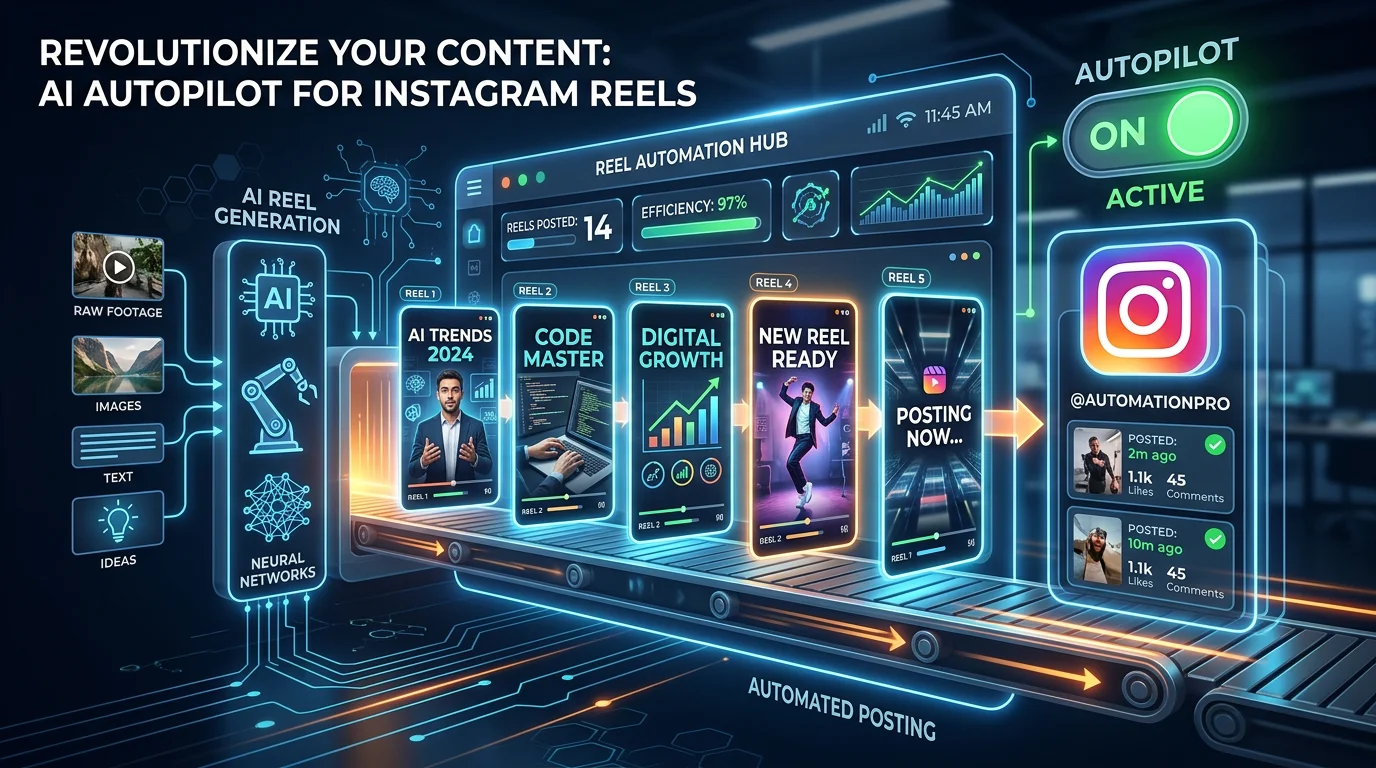
Try FlowShorts Free →If you use FlowShorts for automated Reels creation, every video is rendered at 1080×1920 pixels, 30fps, H.264 — the exact optimal specs. Images are generated at the correct aspect ratio, captions are positioned within the safe zone, and the finished video is auto-posted to Instagram Reels (plus YouTube Shorts and TikTok) in the right format for each platform.
No need to think about dimensions, safe zones, or export settings — the system handles it. Explore Instagram Reels auto-posting or see Instagram Reels ideas by niche for content inspiration.
Frequently Asked Questions
What size should Instagram Reels be?
1080 × 1920 pixels with a 9:16 aspect ratio. This is the standard vertical resolution. Export as MP4 with H.264 codec at 30fps and 10-15 Mbps bitrate for optimal quality after Instagram's re-encoding.
What happens if I upload a non-9:16 video as a Reel?
Instagram adds black bars (letterboxing) to fill the 9:16 frame. A 16:9 horizontal video gets large bars above and below. A 1:1 square video gets bars on the sides. The Reel technically works but looks unprofessional and wastes screen space.
What is the safe zone for text on Reels?
Keep text and critical visuals within the center 60% of the frame — roughly a 900×1200 pixel rectangle. The top 10% (username overlay), bottom 20% (caption, buttons), and right edge (interaction icons) are covered by Instagram's UI during playback.
What is the maximum Reels file size?
4 GB. In practice, a 3-minute Reel at 1080×1920 and 15 Mbps bitrate is roughly 340 MB — well under the limit. You won't hit the file size cap with standard export settings.
Should I use 30fps or 60fps for Reels?
30fps for most content. 60fps doubles file size with no visible quality improvement for talking-head, tutorial, or narrated content. Use 60fps only for fast-motion content (sports, action, transitions) where smoother playback matters.
What size is the Reels cover photo?
Cover photos are displayed at 1080×1920 (9:16) in the Reels tab but cropped to 1080×1080 (1:1 center square) on your profile grid. Design covers with the most important elements in the center so they look good in both views.
Related Guides
- Instagram Reels Length Limit Guide
- Best Time to Post Reels for Maximum Engagement
- YouTube Shorts Dimensions & Specs Guide
- How to Reset Your Instagram Algorithm
- 50 Video Editing Tips for Beginners & Pros
Perfect Reels Specs, Every Time
FlowShorts renders every Reel at 1080×1920, 30fps, with captions in the safe zone — then auto-posts to Instagram, YouTube Shorts, and TikTok. No dimension guesswork, no export settings, no manual uploading.