How to Automate Social Media Posts for Real Growth
Learn how to automate social media posts with strategies that actually work. Discover the best tools and workflows to scale your content and save valuable time.
FlowShorts Team
Automating social media posts means using software to schedule, create, and publish content without doing it by hand every day. You set up the rules once, and the system handles the repetitive posting work on a schedule you define.
This guide covers the practical steps: choosing the right type of tool, setting up your workflow, and measuring what's working.
Why Automate Social Media Posts?
The core problem is simple: platforms reward consistent posting, but consistent posting is exhausting. Uploading to TikTok, reformatting for Reels, re-uploading to YouTube Shorts, writing platform-specific captions... for one video. Multiply that by daily posting and it's unsustainable for most creators or small teams.
Automation fixes three things:
- Time: You stop spending hours on upload-and-schedule tasks. That time goes back into making better content or growing your business.
- Consistency: Your channels stay active on a predictable schedule, even when you're busy, traveling, or sick. Algorithms notice the regularity.
- Scale: One automated workflow can push content to three platforms simultaneously. Without automation, managing even two platforms feels like two separate jobs.

Three Types of Automation Tools
Not all automation tools do the same thing. Pick the one that solves your actual bottleneck.
| Tool Type | What It Does | Best For | Examples |
|---|---|---|---|
| Schedulers | Queue and publish content you've already made | Creators who make their own content but hate the posting process | Buffer, Hootsuite, Sprout Social |
| AI text generators | Write captions, brainstorm post ideas, generate written content | Anyone who struggles with writer's block or needs text at volume | Jasper, Copy.ai |
| AI video platforms | Create full videos (script, voiceover, visuals, captions) and post them | Anyone focused on short-form video who wants the entire pipeline automated | FlowShorts, Pictory |
If your bottleneck is posting, a scheduler is enough. If your bottleneck is making the content in the first place, you need a creation tool. Most people underestimate how much time goes into production vs. publishing.
How to Set Up Your Automation (Step by Step)
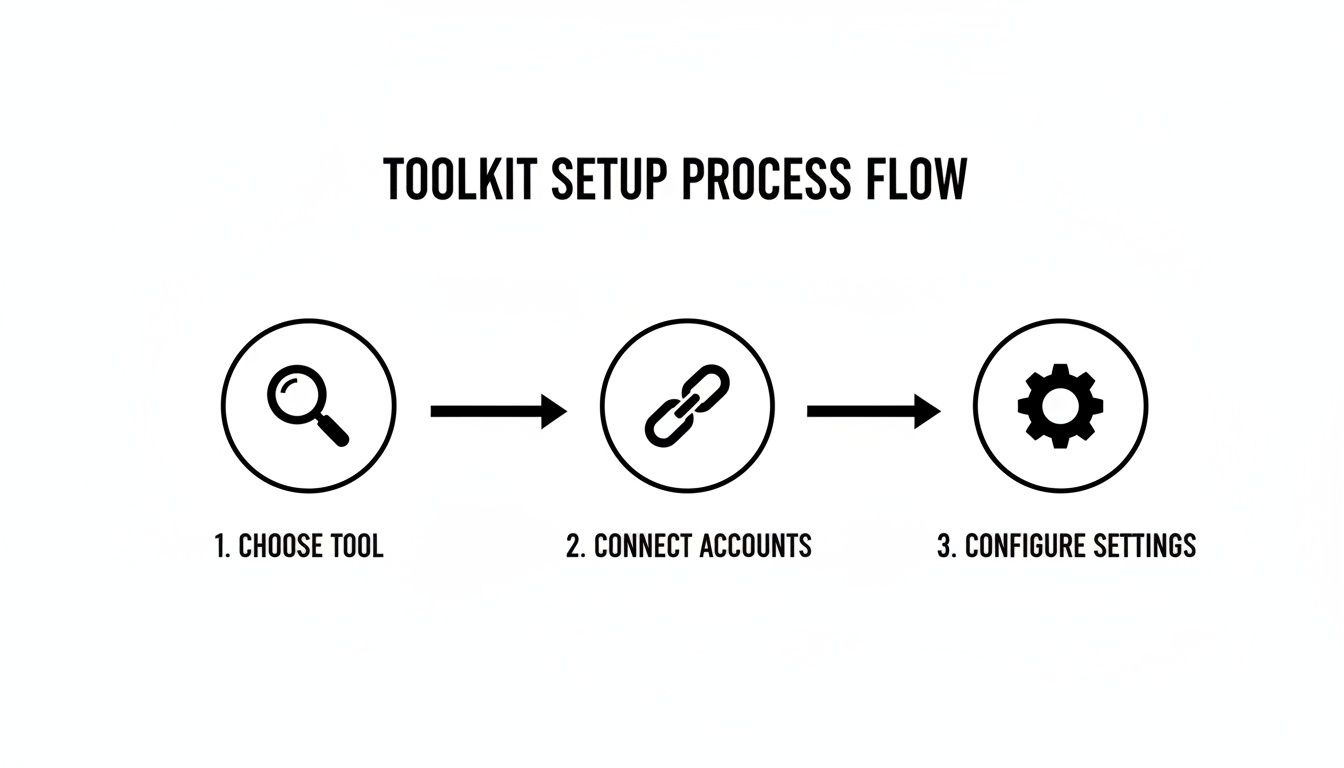
Step 1: Connect Your Accounts
Every reputable automation tool uses OAuth to connect your social accounts. OAuth lets the tool post on your behalf without you sharing your password. If a tool asks for your actual login credentials, don't use it.
Connect all the platforms you want to post to: YouTube, TikTok, Instagram. Most tools support all three from one dashboard.
Step 2: Define Your Posting Schedule
Check your platform analytics to see when your audience is most active. Set your automation tool to publish during those windows. A typical starting schedule:
- TikTok: 1x/day, early afternoon or evening
- YouTube Shorts: 1x/day, morning or early afternoon
- Instagram Reels: 1x/day, evening
Automate Your Entire Video Workflow
FlowShorts generates scripts, creates videos, and posts to YouTube, TikTok & Instagram on autopilot.
Start Automating Free →You can adjust these times as you gather performance data. The point is to start with a consistent cadence and refine from there.
Step 3: Choose Your Workflow Model
There are two approaches:
Simple (schedule only): You create the content yourself, then load it into your scheduler. The tool handles timing and publishing. Good if you enjoy making content but want to batch your uploads.
Full pipeline (create + publish): An AI tool generates the content from scratch and posts it automatically. You define the niche and schedule; the system handles scripting, visuals, voiceover, captions, and publishing. This is how platforms like FlowShorts work for faceless video content.
Step 4: Set Platform-Specific Rules
Don't post identical content across all platforms. Each one has different norms:
- TikTok: Short, casual captions. Fewer hashtags (3-5 targeted ones). Trending sounds help discovery.
- Instagram Reels: Slightly longer captions. Broader hashtag mix (10-15). CTA pointing to bio link.
- YouTube Shorts: Keyword-rich titles for search. Longer descriptions with links. Subscribe CTA in description.
Most automation tools let you customize captions and hashtags per platform. Set these rules once and the system applies them to every post.
What to Automate (and What Not To)
Automation works best for content that's evergreen and repeatable:
- Educational content (tips, facts, how-tos)
- Motivational quotes and affirmations
- "On this day in history" formats
- Product highlights and feature explainers
- Repurposed clips from longer content
What you shouldn't automate: trend responses, personal stories, live engagement, community replies. These need a human touch because they depend on timing and authenticity.
The goal is to let automation handle the steady, daily output while you focus on the higher-value creative work and community interaction.
Measuring What's Working
Automation without measurement is just content on autopilot going nowhere. Check these metrics weekly:
Automate Your Entire Video Workflow
FlowShorts generates scripts, creates videos, and posts to YouTube, TikTok & Instagram on autopilot.
Start Automating Free →- Watch time / retention: How long people actually watch before scrolling. This is the metric platforms use to decide whether to show your video to more people.
- Follower growth rate: Track the weekly change, not the total number. A flat total with a rising rate means momentum is building.
- Shares and saves: A share means someone found your content worth forwarding. A save means they want to come back to it. Both signal high-quality content to the algorithm.
- Click-through rate: If you're driving traffic to a link (bio, description), this tells you whether your CTAs are landing.
Testing and Refining
Change one variable at a time and compare results:
- Hooks: Does a question opening outperform a fact-based opening?
- Posting times: Morning vs. evening for the same content type
- CTAs: "Comment your answer" vs. "Share this with a friend"
- Content topics: Which of your niches consistently gets higher retention?
Each test gives you a data point. Over a few weeks, patterns emerge that tell you exactly how to tune your automation settings for better results.
Common Questions
Will I Get Banned for Automating Posts?
No, as long as you use tools that connect through official platform APIs (OAuth). TikTok, Instagram, and YouTube all support authorized third-party publishing. What gets accounts penalized is spam behavior: buying followers, auto-commenting, or posting duplicate content at scale. Legitimate scheduling and AI content tools don't do any of that.
Does Automated Content Feel Robotic?
It depends on the tool and your inputs. A generic prompt produces generic output. Specific creative direction (your niche, your tone, your topic angles) produces content that feels intentional. The key: automate the production and posting, but keep the creative direction human.
What Does It Cost?
Schedulers like Buffer start free (limited accounts) and go up to $100+/month for teams. AI video platforms like FlowShorts start around $19/month. Compare that against the hours you currently spend on manual production and posting to judge the ROI.
How Much Oversight Does It Need?
After initial setup, plan on a weekly check-in. Review performance metrics, spot-check content quality (especially for factual niches like finance or health), and adjust your inputs based on what the data shows. Day-to-day production and posting runs without you.
Related Guides
- Best AI Video Generators of 2026
- How to Schedule TikTok Videos for Maximum Growth
- 12 Best Content Marketing Automation Tools (2026)
- What Is Content Automation? A Practical Guide
- How to Manage Multiple Social Media Accounts
Compare Social Media Automation Tools
Want a detailed comparison of video automation tools?
Related: How to Turn Tweets Into Videos Automatically
Free tools: AI Prompt Generator · Video Topic Generator