5 Best Free AI YouTube Shorts Makers (Tested & Ranked)
We tested the top 5 free AI YouTube Shorts makers and ranked them by output quality, ease of use, free tier limits, and watermark policy.
FlowShorts Team

YouTube Shorts get over 70 billion daily views. AI video tools can now generate complete Shorts from a text prompt or long-form video in minutes, and several of them have free tiers.
We tested five popular AI YouTube Shorts makers using the same prompt and ranked them by output quality, free tier limits, watermark policy, and ease of use.
How We Tested
Each tool was tested with the same prompt: "Create a 60-second YouTube Short about 5 productivity tips for remote workers."
| Criteria | What We Measured |
|---|---|
| Output Quality | Video resolution, visual coherence, caption accuracy |
| Ease of Use | Time from signup to finished video |
| Free Tier | How many videos you can make for free per month |
| Watermark | Whether the free plan adds a watermark |
| AI Features | Script generation, auto-captions, voiceover, music |
Quick Comparison
| Tool | Type | Free Videos/Month | Watermark | Best For |
|---|---|---|---|---|
| CapCut | Editor + AI | Unlimited | No | Manual editing with AI assists |
| Canva | Text-to-video | 5 exports | No | Template-based creators |
| InVideo AI | Text-to-video | 4 exports | Yes | Quick prompt-to-video generation |
| FlowShorts | Text-to-video | 1 video | No | Full automation + multi-platform posting |
| Opus Clip | Clip-based | 3 clips | Yes | Repurposing long videos into Shorts |
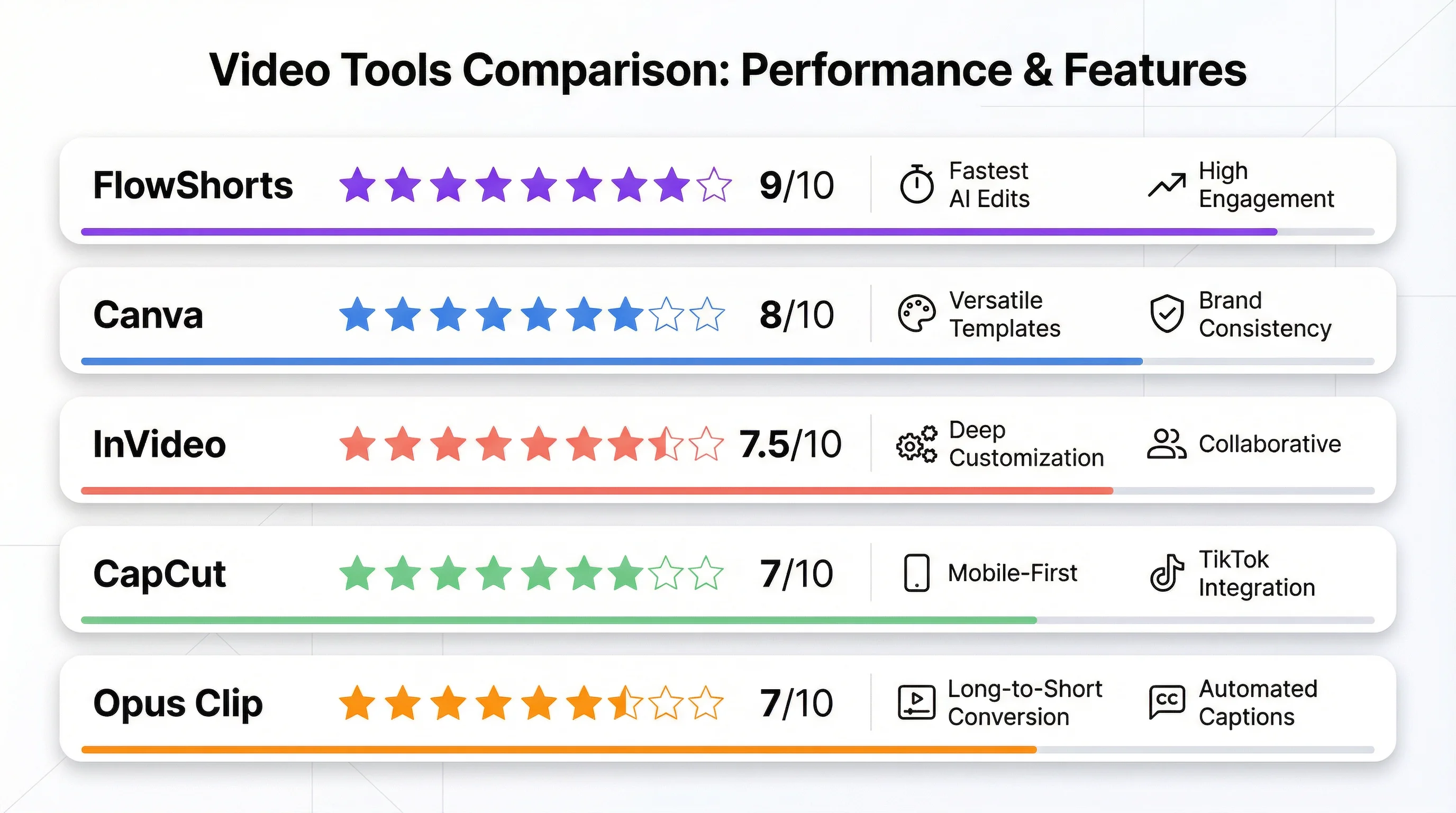
1. CapCut — Best Free Editor with AI Features
What it does: CapCut is a free video editor (by ByteDance/TikTok) with built-in AI features including auto-captions, text-to-speech, background removal, and AI editing suggestions.
Strengths:
- Completely free with no watermark
- Unlimited exports
- Best auto-captioning accuracy among the tools we tested
- AI text-to-speech in dozens of voices
- Available on desktop, mobile, and browser
- Direct export to TikTok
Weaknesses:
- Not a video generator. You still need to create or source raw footage
- No text-to-video generation (you provide the clips)
- No auto-posting to YouTube
- Requires hands-on editing work
Free tier: Unlimited exports, no watermark
Paid plans: CapCut Pro from $8/mo (extra AI features, cloud storage)
Best for: Creators who have raw footage and want a powerful free editor with AI-assisted features. Not for fully automated video generation.
2. Canva — Best for Template-Based Creators
What it does: Canva's video maker lets you create vertical Shorts using templates, stock footage, and AI features like text-to-video and Magic Write for scripts.
Strengths:
- Thousands of Shorts templates
- Drag-and-drop editor is intuitive
- No watermark on free exports
- AI features include Magic Write (script generation) and Beat Sync (auto-sync to music)
- Integrates with Canva's full design ecosystem
Weaknesses:
- Not purpose-built for YouTube Shorts. It's a general design tool
- AI video generation is basic compared to dedicated tools
- No auto-posting to YouTube
- Premium stock footage and some AI features require Canva Pro ($13/mo)
Create Faceless Videos on Autopilot
FlowShorts generates and posts AI videos to YouTube, TikTok & Instagram while you sleep.
Try FlowShorts Free →Free tier: 5 video exports/month, no watermark
Paid plans: Canva Pro from $13/mo
Best for: Creators who already use Canva and want to add Shorts to their workflow with templates and manual customization.
3. InVideo AI — Best for Text-to-Video
What it does: InVideo AI generates videos from text prompts. Type a topic or paste a script, and it produces a complete video with stock footage, voiceover, music, and captions.
Strengths:
- Text-to-video output is coherent, with visuals well-matched to script
- Large stock media library
- Good AI voiceover quality
- Supports multiple languages and accents
- Can edit generated videos after creation
Weaknesses:
- Free plan adds a watermark
- 4 exports/month on the free tier
- Interface can feel cluttered for beginners
- Auto-posting requires third-party tools
Free tier: 4 exports/month, watermark included
Paid plans: From $25/mo (removes watermark, more exports)
Best for: Creators who want to generate quick videos from text prompts and don't mind a watermark on free exports.
4. FlowShorts — Best for Full Automation
What it does: FlowShorts generates complete YouTube Shorts from a topic or script. It handles scriptwriting, AI voiceover, visual generation, captions, and auto-posting to YouTube, TikTok, and Instagram.
Strengths:
- End-to-end automation: enter a topic, get a published video
- Auto-posts directly to YouTube, TikTok, and Instagram on a schedule
- No watermark on the free plan
- Built specifically for faceless short-form content
Weaknesses:
- Free plan limited to 1 video (paid plans start at $19/month for 8 videos)
- Short-form only. No long-form video creation
- Less manual control over editing compared to CapCut or Canva
Free tier: 1 video/month, no watermark
Paid plans: Starter $19/mo (8 videos), Creator $39/mo (30 videos), Pro $69/mo (60 videos)
Best for: Creators who want to automate their entire Shorts pipeline without editing manually. Useful for faceless YouTube channels and multi-platform posting.
5. Opus Clip — Best for Repurposing Long Videos
What it does: Opus Clip takes a long-form video (YouTube, Zoom, podcast) and uses AI to identify the most engaging moments, then clips them into vertical Shorts with auto-captions and a virality score.
Create Faceless Videos on Autopilot
FlowShorts generates and posts AI videos to YouTube, TikTok & Instagram while you sleep.
Try FlowShorts Free →Strengths:
- AI clip selection finds strong moments from long videos
- Virality score helps prioritize which clips to post
- Auto-captions and speaker detection
- Good for repurposing existing content at scale
Weaknesses:
- Free plan limited to 3 clips per upload
- Adds a watermark on free exports
- Only works with existing video. Cannot generate from text
- Clip quality depends on source video quality
Free tier: 3 clips per upload, watermark
Paid plans: From $19/mo
Best for: Creators and podcasters who have long-form content and want to repurpose it into Shorts automatically.
Text-to-Video vs. Clip-Based: Which Type Do You Need?
| Type | Tools | Use When... |
|---|---|---|
| Text-to-video | FlowShorts, InVideo AI, Canva | You're creating Shorts from scratch with no existing footage |
| Clip-based | Opus Clip, CapCut | You have long-form videos and want to cut them into Shorts |
If you're building a faceless YouTube channel, text-to-video tools generate everything from a topic prompt. If you're a podcaster or long-form creator repurposing existing content, clip-based tools are the better fit.
Free Creator Tools
Common Questions
Can I Make YouTube Shorts with AI Without a Watermark?
Yes. CapCut, Canva, and FlowShorts all offer watermark-free exports on their free plans. InVideo AI and Opus Clip add watermarks on free tiers and require a paid plan to remove them.
Can I Monetize YouTube Shorts Made with AI?
Yes. YouTube allows monetization of AI-assisted content as long as it provides value to viewers and follows YouTube's AI content policies. You must disclose AI-generated content where required. Many creators monetize AI-generated Shorts through the YouTube Partner Program.
Do These Tools Work for TikTok and Instagram Reels Too?
Most do. FlowShorts auto-posts to all three platforms. CapCut exports directly to TikTok. Canva and InVideo AI let you download and upload manually. Since Shorts, TikTok, and Reels all use 9:16 vertical format, any video made for one works on all three.
Related Guides
- How to Start a Faceless YouTube Channel
- 50 Faceless YouTube Channel Ideas
- How to Post YouTube Shorts
- How Many YouTube Shorts to Post Per Day
Detailed Comparisons
Need a deeper breakdown of these Shorts makers? Check our side-by-side comparisons:
Need content ideas? Browse YouTube Shorts Ideas by Niche — 30+ niches with hooks and concepts.


