Best AI Tools to Automate a Faceless YouTube Channel in 2026
The complete AI toolkit for automating a faceless YouTube channel in 2026. Covers 8 tools across the full production stack — from scripting and voiceover to visuals, editing, SEO optimization, and auto-posting.
FlowShorts
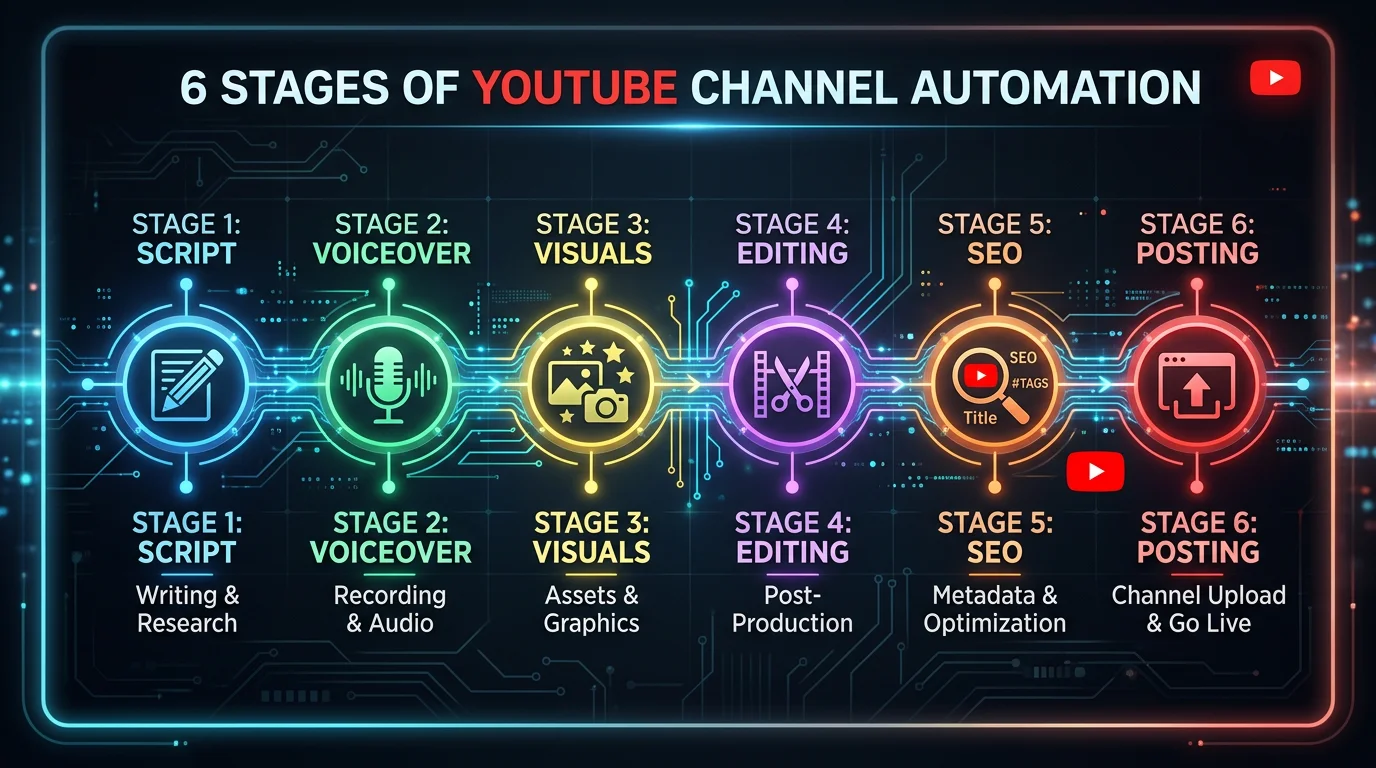
Running a faceless YouTube channel used to require a small team. You needed a scriptwriter to research topics and write narration. A voiceover artist to record audio. A video editor to stitch everything together. A designer to create thumbnails. And someone who understood YouTube SEO to optimize titles, tags, and descriptions. In 2026, AI tools handle every single one of those roles. This guide covers the full automation stack: 8 tools across 6 categories that let you run a faceless YouTube channel with minimal daily effort.
Whether you are building a faceless YouTube channel from scratch or looking to automate one you already run, this breakdown will help you pick the right tools for each stage of production.
The 6 Categories of YouTube Channel Automation
Every faceless YouTube video goes through the same production pipeline. Understanding this pipeline is the key to choosing the right tools:
- Scripting — researching topics, generating ideas, writing narration
- Voiceover — converting scripts into natural-sounding audio
- Visuals & Video Generation — creating images, footage, or full videos from prompts
- Editing & Captions — assembling clips, adding transitions, overlaying captions
- SEO & Optimization — titles, descriptions, tags, thumbnails, analytics
- Posting & Scheduling — uploading to YouTube and cross-posting to other platforms
Most creators piece together 3-4 tools to cover this pipeline. Some prefer all-in-one tools that handle the entire workflow in exchange for less granular control. Others build a DIY stack for maximum quality at each step. Both approaches work — it depends on how much time you want to spend.
The 8 Best AI Tools for Faceless YouTube Channels
Scripting: ChatGPT / Claude
The foundation of every faceless video is the script. Large language models like ChatGPT and Claude are the best tools for this job because they handle ideation, research, and writing in a single conversation. You can brainstorm 20 video topics in a niche, outline a script structure, and generate full narration — all in minutes.
The trade-off is that this is a manual workflow. You copy the output, paste it into your video tool, and repeat for each video. But the flexibility is unmatched. You can specify tone, structure, word count, and target audience in ways that template-based tools cannot match.
- Price: Free tier available. ChatGPT Plus is $20/mo, Claude Pro is $20/mo.
- Best for: Custom scripts, topic research, ideation, and repurposing existing content.
- Limitation: No integration with video tools — you handle the handoff manually.
If you want a faster starting point, the free video script generator on FlowShorts creates YouTube Shorts scripts in seconds without needing to craft a prompt.
Voiceover: ElevenLabs
ElevenLabs has set the standard for AI text-to-speech. Their voices are the most natural-sounding on the market, with realistic pacing, emotional range, and multilingual support. For faceless channels, voice quality is everything — it is the only human element your audience hears.
ElevenLabs offers voice cloning, so you can create a consistent brand voice across all your videos. They support 30+ languages, which opens the door to running faceless channels in multiple markets. The API is well-documented, which is why most video automation tools (including FlowShorts) use ElevenLabs under the hood.
- Price: Free tier with limited characters. Paid plans from $5/mo.
- Best for: Premium narration quality, voice cloning, multilingual content.
- Limitation: Free tier is very limited. Costs add up at volume if you are using the API directly.
For more on AI voiceover options, see our guide on how to get AI voice on YouTube Shorts.
Visuals & Video Generation: FlowShorts
FlowShorts is an all-in-one faceless video automation tool that handles the entire pipeline from script generation through posting. You pick a niche, connect your social accounts, and the system generates and posts videos on autopilot. Each video goes through a full production pipeline: AI script writing, image generation, voiceover (via ElevenLabs), animated captions, background music, and professional rendering.
What separates FlowShorts from standalone video generators is the auto-posting. Videos are automatically published to YouTube Shorts, TikTok, and Instagram Reels on a schedule you set. There is no downloading files, no manual uploading, and no copy-pasting titles and descriptions. You set it up once and the channel runs itself.
- Price: From $19/mo (Starter plan, 8 videos/month). Creator plan at $39/mo for daily posting.
- Best for: Full automation of Shorts-focused faceless channels. Creators who want a hands-off workflow.
- Limitation: Focused on short-form content (60-second videos). Not built for long-form YouTube content.
If you want to compare FlowShorts against other generators with auto-posting, we published a detailed comparison of faceless video generators that auto-post.
Create Faceless Videos on Autopilot
FlowShorts generates and posts AI videos to YouTube, TikTok & Instagram while you sleep.
Try FlowShorts Free →Visuals & Video Generation: InVideo AI
InVideo AI takes a different approach. You type a text prompt describing the video you want, and it generates a complete video using stock footage, AI narration, transitions, and text overlays. The output quality is solid, and it works well for videos between 1 and 15 minutes — a range that most Shorts-focused tools do not cover.
For faceless channels that produce longer content — explainers, listicles, documentary-style videos — InVideo AI is one of the best options available. The stock footage library is extensive, and the AI does a reasonable job matching visuals to narration. You can also edit the generated video scene-by-scene if the first output is not quite right.
- Price: From $25/mo.
- Best for: Long-form faceless content, stock-footage-based videos, creators who want more control over the output.
- Limitation: No auto-posting. You download the video and upload it yourself. Editing after generation can be clunky.
For a broader look at AI video generators, see our best AI video generators roundup.
Editing & Captions: CapCut
CapCut has become the default video editor for short-form creators, and for good reason. It is free, available on mobile and desktop, and packed with AI features that speed up editing. The auto-caption feature is arguably the best on the market — it generates accurate, stylized captions with word-level timing that match the TikTok aesthetic audiences expect.
For faceless channel creators who build their own videos (rather than using an all-in-one tool), CapCut is where the assembly happens. You import your AI-generated images or stock footage, add the voiceover from ElevenLabs, apply transitions, overlay captions, and export. The learning curve is minimal compared to Premiere Pro or DaVinci Resolve.
- Price: Free with a very capable feature set. Pro plan at $8/mo removes watermarks and adds premium features.
- Best for: Manual editing with AI assists, adding captions, creators who want hands-on control.
- Limitation: Requires manual work for each video. No automation — you are the editor.
SEO & Optimization: VidIQ
VidIQ is a YouTube-specific SEO tool that helps you optimize every video for search and discovery. It provides keyword research (showing search volume and competition for any term), tag suggestions, competitor analysis, and trend alerts. The browser extension adds an overlay to YouTube Studio that shows you optimization scores in real time as you fill in titles and descriptions.
For faceless channels, VidIQ solves a critical problem: you cannot rely on personality to drive views. Your videos need to be found through search and recommendations, which makes SEO optimization non-negotiable. VidIQ also offers thumbnail A/B testing on paid plans, letting you test two thumbnails against each other and automatically use the winner.
- Price: Free tier with basic features. Pro plan from $7.50/mo.
- Best for: Keyword research, title/tag optimization, tracking channel analytics, competitor research.
- Limitation: The AI title/description suggestions are decent but not exceptional. Works best as a research tool rather than a content generator.
SEO & Optimization: TubeBuddy
TubeBuddy overlaps with VidIQ but leans more toward channel management at scale. Its strongest features are bulk processing (update tags, descriptions, or end screens across multiple videos at once), A/B testing for thumbnails and titles, and a solid keyword explorer. If you are running multiple faceless channels or publishing at high volume, TubeBuddy's bulk tools save significant time.
The thumbnail A/B testing feature is particularly valuable for faceless channels. Since you do not have a recognizable face to put on thumbnails, testing different visual approaches is how you find what drives clicks in your niche.
- Price: Free tier available. Pro plan from $7.99/mo.
- Best for: Bulk channel management, A/B testing thumbnails and titles, managing multiple channels.
- Limitation: Some feature overlap with VidIQ — most creators only need one of the two.
Thumbnails: Canva
Canva is the fastest way to create professional YouTube thumbnails without design skills. Their template library includes thousands of YouTube-specific layouts, and the AI image generation feature lets you create custom visuals without leaving the editor. Brand kits ensure every thumbnail follows your channel's color scheme and typography.
For faceless channels, thumbnail consistency matters more than you might think. Viewers start recognizing your visual style before they read the title. Canva's bulk creation features let you design a template once and produce variations for dozens of videos, maintaining that consistency without repetitive design work.
- Price: Free tier is surprisingly capable. Pro plan at $13/mo adds brand kits, premium templates, and AI features.
- Best for: Creating professional thumbnails fast, maintaining brand consistency, batch-creating thumbnail variations.
- Limitation: Not YouTube-specific. You need to know what makes a good thumbnail — Canva just makes execution faster.
Full Automation Stack Comparison Table
Create Faceless Videos on Autopilot
FlowShorts generates and posts AI videos to YouTube, TikTok & Instagram while you sleep.
Try FlowShorts Free →| Category | Tool | What It Automates | Price | YouTube-Specific? |
|---|---|---|---|---|
| Scripting | ChatGPT / Claude | Topic research, script writing, ideation | Free / $20/mo | No |
| Voiceover | ElevenLabs | Text-to-speech narration, voice cloning | Free / $5/mo | No |
| Video Generation | FlowShorts | Script → video → auto-post (full pipeline) | $19/mo | Yes |
| Video Generation | InVideo AI | Prompt-to-video with stock footage | $25/mo | No |
| Editing & Captions | CapCut | Video editing, auto-captions, transitions | Free / $8/mo | No |
| SEO | VidIQ | Keywords, tags, titles, competitor analysis | Free / $7.50/mo | Yes |
| SEO | TubeBuddy | Bulk management, A/B testing, tags | Free / $7.99/mo | Yes |
| Thumbnails | Canva | Thumbnail design, brand kits, AI visuals | Free / $13/mo | No |
The Two Approaches: All-in-One vs DIY Stack
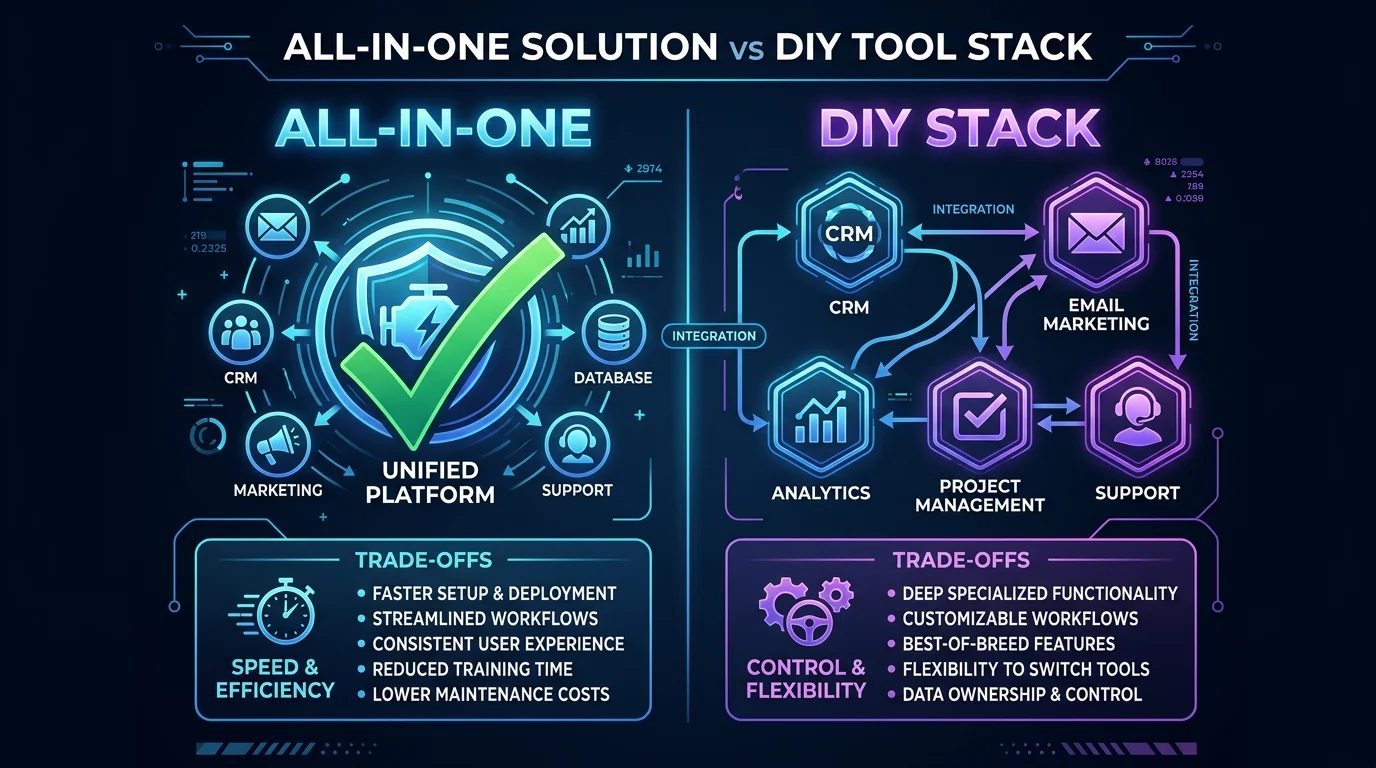
There are two fundamentally different ways to automate a faceless YouTube channel. Neither is objectively better — they optimize for different things.
The all-in-one approach uses a tool like FlowShorts or similar automation software to handle the entire pipeline. You set up your niche, connect your accounts, and the tool generates and posts videos automatically. The upside is speed and consistency — you can have a channel running in under 10 minutes. The downside is less control over individual creative decisions.
The DIY stack approach pieces together specialized tools: ChatGPT for scripts, ElevenLabs for voice, CapCut for editing, VidIQ for SEO, and Canva for thumbnails. You get maximum control over every element of every video. The downside is time — even with AI handling the heavy lifting, you are still assembling each video manually.
| Factor | All-in-One (FlowShorts) | DIY Stack |
|---|---|---|
| Setup time | Under 10 minutes | 1-2 hours to configure all tools |
| Daily effort | Near zero after setup | 30-60 minutes per video |
| Monthly cost | $19-69/mo (single tool) | $30-70/mo (multiple subscriptions) |
| Video quality | Consistent, template-driven | Higher ceiling with manual refinement |
| Flexibility | Limited to tool's capabilities | Full control over every element |
| Best for | Shorts, volume, consistency | Long-form, custom style, quality-first |
Many successful creators start with an all-in-one tool to validate the niche, then layer in DIY elements as the channel grows. This lets you test quickly without committing hours of daily work to a niche that might not perform.
Is Faceless YouTube Automation Actually Profitable?
Yes — but expectations need to be realistic. YouTube Shorts RPM (revenue per thousand views) ranges from $0.01 to $0.07 depending on niche and audience geography. A faceless channel generating 1 million views per month earns roughly $100 to $700 from ads alone. That is not life-changing money on its own.
Where the real revenue comes from is affiliate marketing and digital products. Faceless channels in niches like finance, tech, and productivity can earn significantly more from affiliate links in descriptions than from ad revenue. The YouTube channel becomes a traffic source rather than the primary revenue stream.
The key factors are consistency and niche selection. Channels that post daily in a well-chosen niche compound views over time. AI automation makes daily posting sustainable without burning out. For a deeper breakdown of actual earnings data, see our guide on faceless YouTube channel income.
Not sure which niche to pick? The free faceless niche finder tool helps you evaluate niche profitability before you commit.
Frequently Asked Questions
Which AI tool is best for YouTube automation?
It depends on what you mean by automation. For full end-to-end automation (scripting through posting), FlowShorts handles the entire pipeline for short-form content. For long-form faceless videos, a combination of ChatGPT (scripting) + InVideo AI (video generation) + VidIQ (SEO) covers the core workflow. There is no single tool that perfectly automates long-form YouTube content yet.
Can you make money with a faceless YouTube channel?
Yes. Thousands of faceless channels are monetized on YouTube. Ad revenue from Shorts ranges from $0.01 to $0.07 per thousand views. The more profitable approach is combining ad revenue with affiliate marketing — promoting relevant products in your video descriptions. Niches like finance, tech, health, and productivity tend to have the highest affiliate payouts.
How much does it cost to automate a YouTube channel?
An all-in-one tool like FlowShorts starts at $19/month for 8 videos per month. A full DIY stack (ChatGPT + ElevenLabs + CapCut Pro + VidIQ) runs approximately $35-55/month depending on usage. Free tiers exist for most tools, so you can start at $0 and upgrade as the channel grows.
Is faceless YouTube content against YouTube's rules?
No. YouTube's policies do not require you to show your face. Faceless content is fully allowed and monetizable through the YouTube Partner Program. The key requirement is that your content must provide original value — meaning it cannot be simple re-uploads or purely AI-generated content without meaningful human direction. Channels that select topics, guide the creative process, and curate the output meet this standard.
Next Steps
This guide covered the tools. If you want the step-by-step process for setting everything up and getting your first videos posted, read our complete guide on how to automate a YouTube channel. It walks through account setup, niche selection, tool configuration, and posting schedules in detail.
For a focused look at YouTube automation tools and how they compare on specific features, that guide goes deeper on the automation side.
Free Tools
- Faceless Niche Finder — evaluate niche profitability before you commit
- Video Script Generator — create YouTube Shorts scripts in seconds
Related Guides
- How to Automate a YouTube Channel — the full step-by-step process
- How to Make Faceless YouTube Videos — beginner's guide
- Best Faceless Video Generators That Auto-Post — focused comparison
- Faceless YouTube Channel Income — real earnings data
- Best AI Video Generators — broader roundup


